
Tangram Angles: Measuring Interior Angle Relationships
Loading the math board and drawing, please wait…
In collections
Tangram & Maths
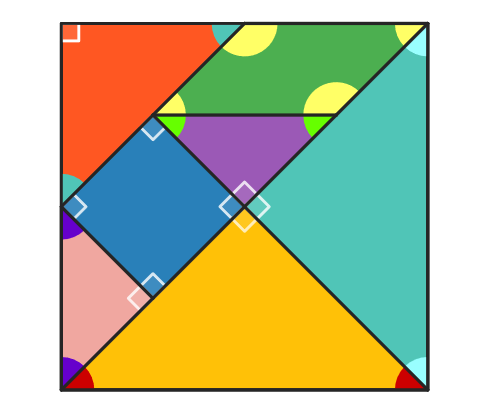
This example explores how the interior angles of Tangram pieces behave under construction and rotation, highlighting which angle measures remain consistent and how geometric constraints shape the resulting angle relationships. It focuses on core ideas of angle measurement and polygon/triangle angle properties, including angle computation via InteriorAngles, relationships induced by parallel lines and intersections, and characteristic features such as isosceles and right triangles. The construction uses Polygon to form Tangram pieces, Segment and Line to define edges and auxiliary references, Midpoint for midpoint-based construction, Intersect to determine key intersection points, Rotate to position pieces correctly, and InteriorAngles to compute and display the relevant interior angles. Suitable for middle and high school geometry learning, interactive demonstrations, and practice with geometric construction and angle properties.
GeoGebra Commands & Parameters
Polygon(A, B, 4) → poli1, frame3, frame4, frame1, frame2, C, DSegment(A, C) → frame12Midpoint(D, C) → EMidpoint(D, A) → FSegment(F, E) → frame5Midpoint(A, C) → GSegment(B, G) → frame9Midpoint(F, E) → HMidpoint(G, C) → ISegment(H, I) → frame7Segment(G, H) → frame8Line(F, frame8) → jIntersect(j, frame12) → JSegment(F, J) → frame11Polygon(A, G, B) → poli2, b_1, a_1, g_1Rotate(O + (a_1, 0), Angle[B - G] + Angle[O - N] - Angle[G - A], O) → PPolygon(N, O, P) → poli4, p, n, oPolygon(B, G, C) → poli3, c_1, b_2, g_2Rotate(L + (b_2, 0), Angle[C - G] + Angle[L - K] - Angle[G - B], L) → MPolygon(K, L, M) → poli5, m, k_1, lPolygon(H, E, C, I) → poli6, h_1, e_1, c_2, i_1Rotate(R + (e_1, 0), Angle[C - E] + Angle[R - Q] - Angle[E - H], R) → SRotate(S + (c_2, 0), Angle[I - C] + Angle[S - R] - Angle[C - E], S) → TPolygon(Q, R, S, T) → poli7, q, r, s, tPolygon(H, G, I) → poli8, i_2, h_2, g_3Rotate(V + (h_2, 0), Angle[I - G] + Angle[V - U] - Angle[G - H], V) → WPolygon(U, V, W) → poli9, w, u, vPolygon(F, H, G, J) → poli10, f_1, h_3, g_4, j_1Rotate(A_1 + (h_3, 0), Angle[G - H] + Angle[A_1 - Z] - Angle[H - F], A_1) → B_1Rotate(B_1 + (g_4, 0), Angle[J - G] + Angle[B_1 - A_1] - Angle[G - H], B_1) → C_1Polygon(Z, A_1, B_1, C_1) → poli11, z, a_2, b_3, c_3Polygon(F, J, A) → poli12, a_3, f_2, j_2Rotate(E_1 + (f_2, 0), Angle[A - J] + Angle[E_1 - D_1] - Angle[J - F], E_1) → F_1Polygon(D_1, E_1, F_1) → poli13, f_3, d_1, e_2Polygon(F, D, E) → poli14, e_3, f_4, d_2Rotate(H_1 + (f_4, 0), Angle[E - D] + Angle[H_1 - G_1] - Angle[D - F], H_1) → I_1Polygon(G_1, H_1, I_1) → poli15, i_3, g_5, h_4InteriorAngles(poli7) → parA, parB, parC, parDInteriorAngles(poli11) → quaA, quaB, quaC, quaDInteriorAngles(poli5) → triGA, triGB, triGCInteriorAngles(poli4) → triVA, triVB, triVCInteriorAngles(poli15) → triAA, triAB, triACInteriorAngles(poli9) → triRA, triRB, triRCInteriorAngles(poli13) → triPUC, triPUA, triPUB
AI Drawing Prompt Reference
Draw a tangram puzzle composed of multiple polygons, including a large square, right triangles, and a parallelogram. Start with a big square, divide it into regions using diagonals and midpoints, then rotate and translate the pieces to arrange them symmetrically around the center. Label the interior angles of each polygon with their measures, highlighting relationships such as right angles, 45-degree angles, and the invariance of angles under rotation.
The prompt above was compiled from the original drawing commands and is for reference only.