
Tessellation from Triangle by abbey
Loading the math board and drawing, please wait…
In collections
Tessellation from Triangle using Rotation
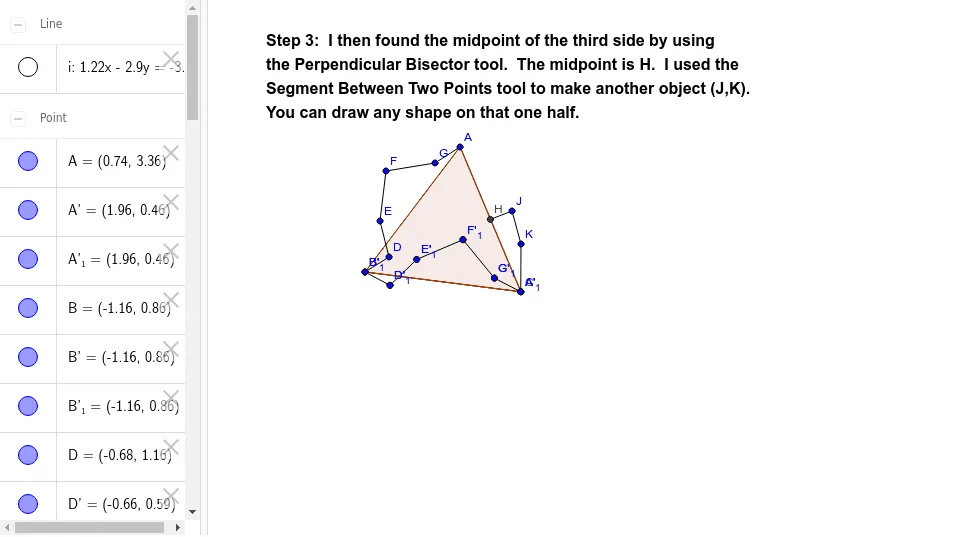
This example demonstrates how to generate a tessellation pattern by rotating a triangle. Key mathematical concepts include rotation and polygons. The construction uses commands such as Polygon, Segment, Rotate, LineBisector, Intersect, and Point. Suitable for middle school and above students to learn geometric construction.
GeoGebra Commands & Parameters
Polygon(A, B, 3) → poly1, a, b, c, CSegment(B, D) → dSegment(D, E) → eSegment(E, F) → fSegment(F, G) → gSegment(G, A) → hRotate(A, 300*°, B) → A'Rotate(B, 300*°, B) → B'Segment(A', B') → a'Rotate(B, 300*°, B) → B'_1Rotate(D, 300*°, B) → D'Segment(B'_1, D') → d'Rotate(D, 300*°, B) → D'_1Rotate(E, 300*°, B) → E'Segment(D'_1, E') → e'Rotate(E, 300*°, B) → E'_1Rotate(F, 300*°, B) → F'Segment(E'_1, F') → f'Rotate(F, 300*°, B) → F'_1Rotate(G, 300*°, B) → G'Segment(F'_1, G') → g'Rotate(G, 300*°, B) → G'_1Rotate(A, 300*°, B) → A'_1Segment(G'_1, A'_1) → h'LineBisector(c) → iIntersect(i, c) → HPoint(i) → ISegment(H, J) → jSegment(J, K) → kSegment(K, C) → l
AI Drawing Prompt Reference
Draw a triangle ABC, then rotate it 300 degrees around point B to create a new triangle A'B'C'. Connect A'B', B'D', D'E', E'F', F'G', and G'A' to form a hexagon. Next, find the perpendicular bisector of line segment c, intersect it with c to get point H, then connect H to point J, J to K, and K to C to form a closed shape.
The prompt above was compiled from the original drawing commands and is for reference only.