
Perigal Proof of Pythagorean Theorem
Loading the math board and drawing, please wait…
In collections
Satz des Pythagoras - Einführung
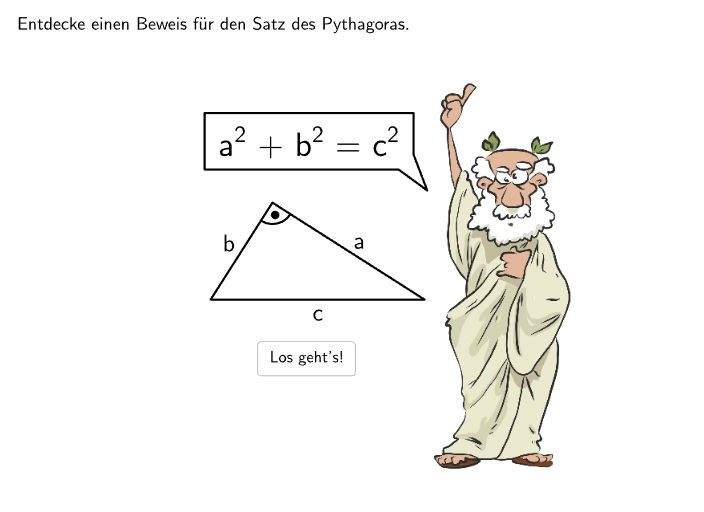
This example demonstrates the Perigal proof of the Pythagorean theorem, showcasing a special quadrilateral's properties. The core mathematical concepts involved include the Pythagorean theorem, geometric shapes' similarity and symmetry. The construction uses GeoGebra's Sequence, Point, Angle, and Segment commands. Suitable for middle school mathematics education and basic geometry knowledge.
GeoGebra Commands & Parameters
Sequence(Random[1, 10], i, 1, 10) → randomNumbers, {9, 3, 5, 6, 2, 10, 10, 10, 10, 4}Element(randomNumbers, Mod[questionCount, Length[randomNumbers]] + 1) → randomNumberTextfield(input) → inputBoxJoin({Sequence[Segment[Corner[4] + (RasterPixMat * ((k * RasterStepXY), 0)), Corner[4] + (RasterPixMat * ((k * RasterStepXY), RasterMaxY))], k, 0, RasterMaxX / RasterStepXY], Sequence[Segment[Corner[4] + (RasterPixMat * (0, (k * RasterStepXY))), Corner[4] + (RasterPixMat * (RasterMaxX, (k * RasterStepXY)))], k, 0, RasterMaxY / RasterStepXY]}) → RasterStreckenJoin({Sequence[Text[UnicodeToLetter[65 + k], Midpoint[Corner[4] + (RasterPixMat * ((k * RasterStepXY), RasterMaxY)), Corner[4] + (RasterPixMat * (((k + 1) * RasterStepXY), RasterMaxY))], false, true, 0, -1], k, 0, RasterMaxX / RasterStepXY - 1], Sequence[Text[("" * k), Midpoint[Corner[4] + (RasterPixMat * (RasterMaxX, ((k - 1) * RasterStepXY))), Corner[4] + (RasterPixMat * (RasterMaxX, (k * RasterStepXY)))], false, true, 1, 0], k, 1, RasterMaxY / RasterStepXY]}) → RasterBeschriftungSequence(Sequence[Corner[4] + (RasterPixMat * ((k * RasterStepXY), (m * RasterStepXY))), k, 0, RasterMaxX / RasterStepXY], m, 0, RasterMaxY / RasterStepXY) → RasterPunkteSequence(Midpoint[PosA, PosB] + (lengthC / 2 * (cos(k°), sin(k°))), k, 30, 150, 5) → PosListCPoint(PosListC) → PosCAngle(PosB, PosC, PosA) → rightAngleMidpoint(PosB, PosC1) → CenterAMidpoint(PosA, PosC2) → CenterBIntersect(Line[CenterA, xAxis], randA1(1)) → PosP1, PosP2Intersect(Line[CenterA, yAxis], randA1(1)) → PosP3, PosP4If(polyA1(1) > polyB1(1), 1, 2) → unterteilungIntersect(Line[CenterB, xAxis], randB1(1)) → PosQ1, PosQ2Intersect(Line[CenterB, yAxis], randB1(1)) → PosQ3, PosQ4Midpoint(PosA, PosB3) → CenterCText("\textsf{\bold{\begin{array}Zieh mich!\end{array}}}", PosC + (0.5, 1.25), false, true, 0, 0) → CapPosCSegment(Midpoint[Corner[CapPosC, 1], Corner[CapPosC, 2]], Midpoint[Corner[CapPosC, 1], Corner[CapPosC, 2]] + (0.5 * Vector[Midpoint[Corner[CapPosC, 1], Corner[CapPosC, 2]], PosC])) → arrowZiehMichSegment(PosA, PosB) → segCSegment(PosB, PosC) → segASegment(PosA, PosC) → segBPolyLine(PosSB, Corner[txt012, 2] + (-0.25, 0), Corner[txt012, 1] + (-0.1, 0), Corner[txt012, 4] + (-0.1, 0.1), Corner[txt012, 3] + (0.1, 0.1), Corner[txt012, 2] + (0.1, 0.35), PosSB) → sb01Angle(Vertex[segSkizze01(1), 1], Vertex[segSkizze01(1), 3], Vertex[segSkizze01(1), 2]) → AngleSkizzeIf(unterteilung ≟ 1, polyA1, polyB1) → poly03SelectedIndex(dropdown051) → index051SelectedIndex(dropdown052) → index052SelectedIndex(dropdown031) → index031SelectedIndex(dropdown032) → index032SelectedIndex(dropdown033) → index033If(step ≟ 3, anim03 ≟ 1, step ≟ 3.5, correctdd031 ∧ correctdd032 ∧ correctdd033, step ≟ 4, anim ≟ 5, step ≟ 5, correctdd051 ∧ correctdd052, true) → clickableBtnNextIf(unterteilung ≟ 2, randB1, randA1) → rand03If(unterteilung ≟ 2, PosM15, PosM25) → MPElement({Polygon[PosA, PosB, PosB3, PosA3]}, 1) → polyCSegment(PosCSquared + (-0.4, -0.2), PosCSquared + (-0.4, -0.2) + (-1.225, 0)) → arrowCSquared
AI Drawing Prompt Reference
Draw a right triangle on the plane using three points A, B, and C, such that the angle at A is a right angle, and connect A–B, A–C, and B–C with straight segment sides. Mark the right angle clearly with an angle indicator. Then construct midpoints on the relevant sides and use them to form a special quadrilateral-like boundary by joining the midpoint-based points and connecting them in a single outline/polyline. Add key labels at the important geometric points to emphasize the Pythagorean proof setup, and include an arrow-style segment pointing toward the central constructed region to guide the viewer’s attention to the relationship between sides and midpoints.
The prompt above was compiled from the original drawing commands and is for reference only.