
Geogebra Geometry Example: Triangles and Cylinders
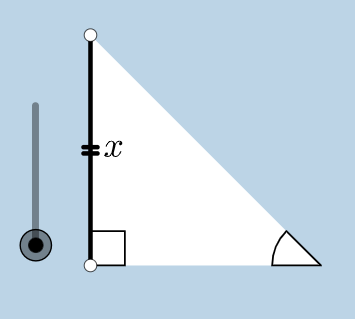
Loading the math board and drawing, please wait…
In collections
Special Right Triangle (1): Thinking Classroom Exploration
This example demonstrates geometric relationships between isosceles triangles, right triangles, and geometric solids like cylinders and prisms using GeoGebra. Key concepts include geometric construction, geometric mean, trigonometry, and solid geometry. Construction involves commands like Circle, Segment, Rotate, Dilate, etc. Suitable for high school students and geometry education.
GeoGebra Commands & Parameters
Circle(B, C) → cSegment(B, C) → aOrthogonalLine(C, a) → bRotate(C, 45°, B) → C'Angle(C, B, C') → αRay(B, C') → dIntersect(b, d) → ASegment(A, C) → eSegment(B, A) → fPolygon(B, C, A) → poly1, a_1, b_1, c_1Line(B, C) → hPoint(h) → DPoint(h) → ERay(C, E) → iPoint(i) → FRay(C, F) → jDilate(B, If[0 < g ≤ 1, 1 - g, 0], C) → B'Segment(B, B') → kDilate(C, If[1 < g ≤ 2, 2 - g, 0], A) → C'_1Segment(C, C'_1) → lCircle(C, (0.2 * a)) → pIntersect(p, j, 1) → GIntersect(p, e, 1) → HIntersect(p, a, 1) → ICircle(A, (0.2 * a)) → qIntersect(q, e, 1) → JIntersect(q, f, 1) → KCircleSector(C, H, I) → sDilate(A, If[2 < g ≤ 3, 3 - g, 0], B) → A'Segment(A, A') → mCircleSector(A, K, J) → tRotate(s, If[3.5 < g ≤ 4.5, ((-(g - 3.5)) * pi / 2), -1.5707963267948966], C) → s'Dilate(A, If[5.5 < g ≤ 6.5, 6.5 - g, 0], B) → A'_1Vector(A, A'_1) → uTranslate(t, u) → t'Rotate(B, If[16 < g ≤ 17, ((-(g - 16)) * pi / 2), ((-pi)) / 2], C) → B'_1Rotate(B', If[4.5 < g ≤ 5.5, ((-(g - 4.5)) * pi / 2), -1.5707963267948966], C) → B''Segment(B'_1, B'') → k'Rotate(t', If[6.5 < g ≤ 7.5, (((-(g - 6.5)) * 5) * pi / 4), -3.92699], B) → t''Dilate(A, If[7.5 < g ≤ 8.5, 8.5 - g, 0], C) → A'_2Vector(A, A'_2) → vTranslate(t, v) → t'_1Rotate(t'_1, If[8.5 < g ≤ 9.5, (((-(g - 8.5)) * 3) * pi / 4), -2.356194490192345], C) → d_1Dilate(A, If[9.5 < g ≤ 10.5, 10.5 - g, 0], C) → A'_3Vector(A, A'_3) → wTranslate(t, w) → t'_2Rotate(t'_2, If[10.5 < g ≤ 11.5, ((-(g - 10.5)) * pi / 2), -1.5707963267948966], C) → e_1Angle(C, B, B'_1) → γAngle(B, C'_1, C) → βAngle(C'_1, C, B) → δCircle(B, (0.2 * a)) → r
AI Drawing Prompt Reference
Draw a geometric figure consisting of a triangle and a cylinder. First, draw two circles and a line segment. Then, construct a perpendicular line. Rotate a point and calculate an angle to generate a ray. Use intersection operations to find triangle vertices, then draw the triangle and related segments. Next, use scaling and rotation to construct a cylinder or similar solid. Finally, draw circles and circular sectors, and calculate an angle. The overall figure should reflect geometric construction, rotation, scaling, and intersection relationships.
The prompt above was compiled from the original drawing commands and is for reference only.