
Shade a spherical triangle on a sphere using “surface”
Loading the math board and drawing, please wait…
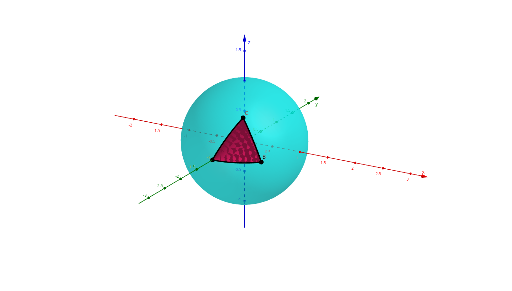
This example demonstrates how to form a spherical (spheric) triangle on the surface of a sphere from three points and then shade the corresponding spherical region using the GeoGebra “surface” feature. The key mathematics includes spherical triangles, spherical (great-circle) arcs as triangle sides, and angle/geometry relationships on a sphere. Construction highlights: a Sphere is created first, then PointIn places the vertices on the sphere. Next, CircleArc builds the three boundary arcs (arcAB, arcBC, arcCA). Angle is used to represent angular information, while UnitVector and Distance help compute geometric relationships needed for consistent construction. Finally, the Surface command shades the triangular patch on the sphere defined by the arcs and vertices. The construct also leverages objects such as the sphere center O, unit/direction-related helpers (e.g., uvoab, uvobc, uvoca), and auxiliary intersection/region-mapping constructs (e.g., inAfromB, inBfromC, inCfromA) to ensure the correct portion of the spherical patch is colored. Suitable for high school to early undergraduate geometry, especially for teaching spherical geometry and 3D visualization.
GeoGebra Commands & Parameters
Sphere((0, 0, 0), 1) → aPointIn(a) → CPointIn(a) → APointIn(a) → BCircleArc(O, A, B) → arcABCircleArc(O, B, C) → ArcBCCircleArc(O, C, A) → arcCAAngle(Plane[O, A, B], Plane[O, A, C]) → aAUnitVector(Vector[O, A] ⊗ Vector[O, B]) → uvoabUnitVector(Vector[O, B] ⊗ Vector[O, C]) → uvobcAngle(Plane[O, B, C], Plane[O, B, A]) → aBAngle(Plane[O, C, A], Plane[O, C, B]) → aCUnitVector(Vector[O, C] ⊗ Vector[O, A]) → uvocaDistance(A, ArcBC) → dADistance(B, arcCA) → dBDistance(C, arcAB) → dCSurface((((cos(t) * A) + (sin(t) * uvoab) ⊗ A - (((A * ((cos(t) * A) + (sin(t) * uvoab) ⊗ A))) * A)) * cos(α)) + (sin(α) * A) ⊗ ((cos(t) * A) + (sin(t) * uvoab) ⊗ A - (((A * ((cos(t) * A) + (sin(t) * uvoab) ⊗ A))) * A)) + (((A * ((cos(t) * A) + (sin(t) * uvoab) ⊗ A))) * A), t, 0, Min[dA, Angle[A, O, B]], α, 0, aA) → inAfromBSurface((((cos(t) * A) - ((sin(t) * uvoca) ⊗ A) - (((A * ((cos(t) * A) + (sin(t) * uvoca) ⊗ A))) * A)) * cos(α)) + (sin(α) * A) ⊗ ((cos(t) * A) + (sin(t) * uvoca) ⊗ A - (((A * ((cos(t) * A) - ((sin(t) * uvoca) ⊗ A)))) * A)) + (((A * ((cos(t) * A) + (sin(t) * uvoca) ⊗ A))) * A), t, 0, Min[dA, Angle[A, O, C]], α, 0, aA) → inAfromCSurface((((cos(t) * B) - ((sin(t) * uvoab) ⊗ B) - (((B * ((cos(t) * B) + (sin(t) * uvoab) ⊗ B))) * B)) * cos(α)) + (sin(α) * B) ⊗ ((cos(t) * B) + (sin(t) * uvoab) ⊗ B - (((B * ((cos(t) * B) + (sin(t) * uvoab) ⊗ B))) * B)) + (((B * ((cos(t) * B) + (sin(t) * uvoab) ⊗ B))) * B), t, 0, Min[dB, Angle[B, O, A]], α, 0, aB) → inBfromASurface((((cos(t) * B) + (sin(t) * uvobc) ⊗ B - (((B * ((cos(t) * B) + (sin(t) * uvobc) ⊗ B))) * B)) * cos(α)) + (sin(α) * B) ⊗ ((cos(t) * B) + (sin(t) * uvobc) ⊗ B - (((B * ((cos(t) * B) + (sin(t) * uvobc) ⊗ B))) * B)) + (((B * ((cos(t) * B) + (sin(t) * uvobc) ⊗ B))) * B), t, 0, Min[dB, Angle[B, O, C]], α, 0, aB) → inBfromCSurface((((cos(t) * C) + (sin(t) * uvoca) ⊗ C - (((C * ((cos(t) * C) + (sin(t) * uvoca) ⊗ C))) * C)) * cos(α)) + (sin(α) * C) ⊗ ((cos(t) * C) + (sin(t) * uvoca) ⊗ C - (((C * ((cos(t) * C) + (sin(t) * uvoca) ⊗ C))) * C)) + (((C * ((cos(t) * C) + (sin(t) * uvoca) ⊗ C))) * C), t, 0, Min[Angle[C, O, A], dC], α, 0, aC) → inCfromASurface((((cos(t) * C) - ((sin(t) * uvobc) ⊗ C) - (((C * ((cos(t) * C) + (sin(t) * uvobc) ⊗ C))) * C)) * cos(α)) + (sin(α) * C) ⊗ ((cos(t) * C) + (sin(t) * uvobc) ⊗ C - (((C * ((cos(t) * C) - ((sin(t) * uvobc) ⊗ C)))) * C)) + (((C * ((cos(t) * C) + (sin(t) * uvobc) ⊗ C))) * C), t, 0, Min[dC, Angle[C, O, B]], α, 0, aC) → inCfromB
AI Drawing Prompt Reference
Draw a spherical triangle on a sphere. First create a sphere, then place three points A, B, and C on its surface. Next, draw great-circle arcs connecting these points to form the triangle sides AB, BC, and CA. Finally, use the Surface command to fill the triangular region bounded by these arcs and points.
The prompt above was compiled from the original drawing commands and is for reference only.