
Seesaw 3D: 3D Geometric Construction and Solid Geometry Analysis
Loading the math board and drawing, please wait…
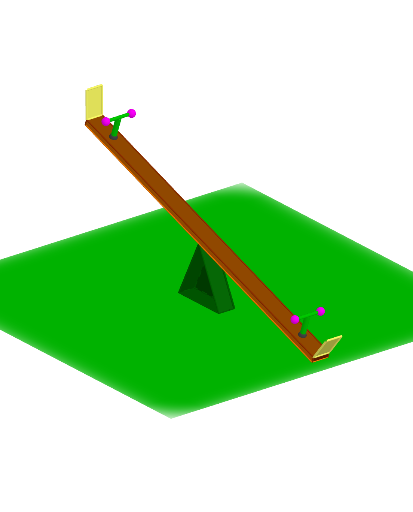
Seesaw 3D demonstrates how to construct and manipulate 3D geometric objects, involving concepts like triangles, circles, and vectors. The construction uses GeoGebra commands such as Point, LineBisector, Sphere, and operations like Midpoint and Rotate. This example is suitable for high school students or college freshmen to learn geometric construction and solid geometry fundamentals.
GeoGebra Commands & Parameters
Point(xAxis) → BPoint(xAxis) → ALineBisector(A, B) → fLine(A, B) → gIntersect(f, g) → CPoint(f) → DSegment(C, D) → hPoint(h) → EPolygon(E, A, B) → t1, b, e, aCircle(E, 6) → cIntersect(c, g, 2) → FIntersect(c, g, 1) → GPoint(c) → HLine(E, g) → iMirror(F, i) → F'Intersect(c, i, 2) → ICircumcircleArc(F', I, F) → dPoint(d) → JRay(J, E) → jIntersect(c, j, 2) → KSegment(K, J) → kLine(A, B) → lRotate(E, 90°, l) → E'Rotate(A, 90°, l) → A'Rotate(B, 90°, l) → B'Polygon(E', A', B') → t1', b', e', a'Rotate(K, 90°, l) → K'Rotate(J, 90°, l) → J'Segment(K', J') → k'Intersect(zAxis, e') → LSphere(L, 0.3) → mIntersect(yAxis, m, 1) → MIntersect(yAxis, m, 2) → NVector(L, N) → uVector(L, M) → vTranslate(B', u) → B''Translate(A', u) → A''Translate(B', v) → B''_{1}Translate(A', v) → A''_{1}Translate(K', u) → K''Translate(J', u) → J''Segment(K'', J'') → k''Translate(K', v) → K''_{1}Translate(J', v) → J''_{1}Segment(K''_{1}, J''_{1}) → k''_{1}Polygon(K'', J'', J''_{1}, K''_{1}) → q1, n, j'', j''_{1}, pTranslate(E', v) → E''Translate(E', u) → E''_{1}Prism(q1, -0.2) → q, S, edgeK''S, edgeJ''T, edge4, edge3, edgeST, edgeTU, edgeUV, edgeSV, T, U, V, faceJ''K''ST, face5, face6, face4, faceSTUVPolygon(E'', E''_{1}, B'', B''_{1}) → q2, e'', e''_{1}, b'', b''_{1}Polygon(E''_{1}, A'', A''_{1}, E'') → q3, r, a'', a''_{1}, sPolygon(E''_{1}, B'', A'') → t2, t, f_1, g_1Polygon(A''_{1}, A'', B'', B''_{1}) → q4, h_1, i_1, j_1, k_1Polygon(E'', A''_{1}, B''_{1}) → t3, l_1, m_1, n_1Sphere(S, 1) → oIntersect(edgeST, o, 1) → OSphere(V, 1) → wIntersect(edgeUV, w) → P,Line(V, S) → p_1Rotate(P, -110°, p_1) → P'Rotate(O, -110°, p_1) → O'Polygon(O', P', V, S) → q5, o', p', v_1, s_1Midpoint(O, P) → QLine(Q, zAxis) → q_1OrthogonalLine(Q, faceSTUV) → r_1Sphere(Q, 0.8) → a_1Intersect(r_1, a_1) → R, WSphere(R, 0.5) → b_1Line(R, yAxis) → t_1Intersect(t_1, b_1) → Z, A_1Segment(Z, A_1) → c_1Segment(R, Q) → d_1Midpoint(K''_{1}, J''_{1}) → B_1OrthogonalPlane(B_1, k''_{1}) → p_2Mirror(R, p_2) → R'Mirror(Q, p_2) → Q'Segment(R', Q') → e_1Mirror(Z, p_2) → Z'Mirror(A_1, p_2) → C_1Segment(Z', C_1) → f_2Mirror(q5, p_2) → q5'
AI Drawing Prompt Reference
In 3D space, draw a horizontal segment as the base, find its midpoint and construct its perpendicular bisector. Pick a point on the bisector as the apex, and connect it to the two base endpoints to form a triangle. With the apex as center, draw a circle intersecting the base line at two points. Choose a point on the circle, reflect it across the base line, and construct an arc through these points. Take a point on the arc, draw a ray to the apex, intersecting the circle again, and connect these two points to form a chord. Rotate the entire triangle 90 degrees about the base line to get a second triangle, and rotate the chord similarly. On the rotated triangle, find the intersection of one edge with the vertical axis, and place a small sphere there. From the sphere center, take two points along the vertical axis (up and down) to define two vectors. Use these vectors to translate the rotated triangle vertices and chord endpoints, creating two translated triangles and a quadrilateral face formed by the four translated chord endpoints.
The prompt above was compiled from the original drawing commands and is for reference only.