
Another Proof Method
Loading the math board and drawing, please wait…
In collections
geometriadinamica.es
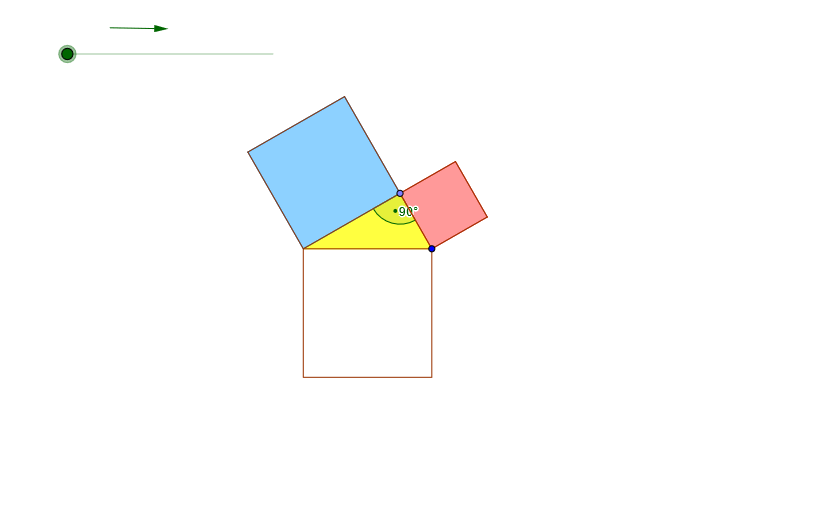
This is a mathematical example that demonstrates the intersection points of triangles and circles. It involves core concepts from geometry and probability statistics, including triangles, circles, angles, and probability distributions. The example uses GeoGebra's Midpoint, CircleArc, Point, Polygon, Angle, Vector, Line, Circle, Intersect, and OrthogonalLine commands and objects to construct the graph. It is suitable for middle school and high school students, particularly those studying geometry and probability statistics.
GeoGebra Commands & Parameters
Midpoint(A, B) → A_1CircleArc(A_1, B, A) → sPoint(s) → CPolygon(A, C, B) → P, b_1, a_1, c_1Angle(A, C, B) → αAngle(C, A, B) → βVector(B_1, C_1) → z_1Line(C, A) → gLine(C, B) → hCircle(C, A) → kCircle(C, B) → pIntersect(k, h, 1) → DIntersect(p, g, 1) → EOrthogonalLine(E, g) → iOrthogonalLine(B, i) → jOrthogonalLine(D, h) → lOrthogonalLine(A, g) → mIntersect(l, m) → FIntersect(i, j) → GOrthogonalLine(A, c_1) → nOrthogonalLine(B, c_1) → qIntersect(l, n) → HIntersect(i, l) → IVector(F, H) → rVector(H, A) → tVector(E, I) → u_1OrthogonalLine(C, c_1) → d_1Intersect(c_1, d_1) → JVector(C, J) → v_1Polygon(K, M, N, L) → Q, k_1, m_1, n_1, l_1Polygon(O, R, S, N) → T, o, r_1, s_1, n_2Circle(A, B) → e_1Intersect(e_1, n, 2) → UOrthogonalLine(U, n) → f_1Intersect(q, f_1) → VPolygon(A, F, D, C) → W, a_2, f_2, d_2, c_2Polygon(C, E, G, B) → Y, c_3, e_2, g_1, b_2Polygon(B, V, U, A) → Z, b_3, v_2, u_2, a_3
AI Drawing Prompt Reference
Draw a geometric figure based on a triangle with circles and perpendicular constructions. Start with three key points forming a triangle, draw the two side lines, and construct circles centered at a vertex passing through the other two vertices. Compute intersection points between each circle and the relevant side line. From these intersection points, drop perpendicular lines to the corresponding side lines, take intersections of those perpendiculars to obtain additional points, and then connect several selected points in order to form multiple quadrilaterals. Mark two angles inside the triangle to emphasize the angular relationships, together with the circle–line intersections and right-angle connections.
The prompt above was compiled from the original drawing commands and is for reference only.