
Sphere Volume Calculation
Loading the math board and drawing, please wait…
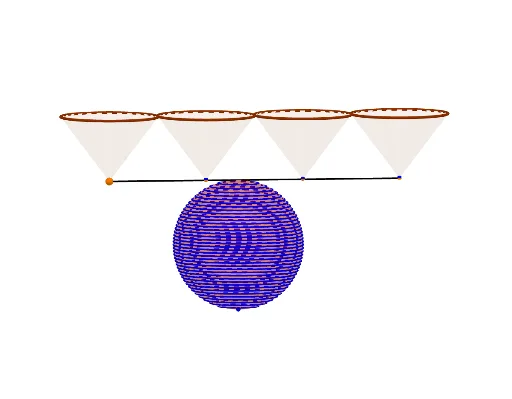
This example demonstrates how to dynamically visualize the calculation process and formula derivation of sphere volume using GeoGebra. Key math concepts include sphere volume formula, integral calculus, and solid geometry. Construction highlights involve commands like Sphere, Cone, Sequence, IntersectPath, and Segment. Suitable for high school and above students to learn and understand the calculation method and geometric significance of sphere volume.
GeoGebra Commands & Parameters
Sphere(I, r + 0.5) → aCone(E, A, r) → b, c, dCone(F, B, r) → e, f, gCone(G, C, r) → h, k, iCone(H, D, r) → j, p, lSequence(z = k, k, -2, 2, 0.1) → LIntersectPath(n, d) → qCone(Center[q], A, Radius[q]) → o, s, t_1IntersectPath(n, g) → c_1Cone(Center[c_1], B, Radius[c_1]) → u, d_1, vIntersectPath(n, i) → e_1Cone(Center[e_1], C, Radius[e_1]) → w, f_1, a_1IntersectPath(n, l) → g_1Cone(Center[g_1], D, Radius[g_1]) → b_1, h_1, i_1IntersectPath(z = -2 + (4 * t), a) → k_1Segment(A, D) → j_1Sequence(IntersectPath[Element[L, k], a], k, 1, (t * Length[L])) → L1
AI Drawing Prompt Reference
Draw a geometric figure related to sphere volume calculation. The figure should include a sphere as a base, multiple cones connected through intersecting paths and sequences. Segments connect key points. The construction order is: first create the sphere, then generate cones, use sequences to create paths, determine cone vertices or bases via intersecting paths, and finally connect these points with segments to form a dynamic figure showing the sphere volume calculation process.
The prompt above was compiled from the original drawing commands and is for reference only.