
Surface of Revolution and 3D Surface Generation
Loading the math board and drawing, please wait…
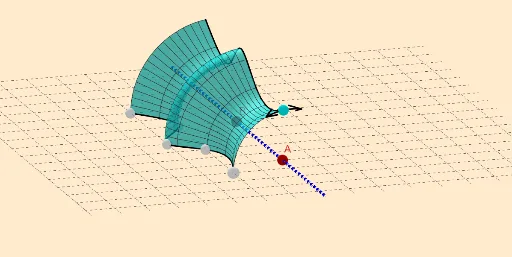
This example demonstrates the process of generating a solid of revolution and a 3D surface by rotating a plane curve around an axis. Key math concepts include solids of revolution, parametric curves, 3D surfaces, and geometric transformations. It utilizes commands like PointIn, Line, Circle, Rotate, and Surface from GeoGebra as per the construction summary. Suitable for high school students and learners needing to understand 3D geometry and calculus applications.
GeoGebra Commands & Parameters
PointIn(g) → A_{1}Line(A, B) → fCircle(f, A_{1}) → cCenter(c) → HPoint(c) → FAngle(A_{1}, H, F) → αIf(z(F) > 0, α, (2 * π) - α) → rotIf(rot > (2 * π) - (2 * π / 20), (2 * π) - rot, (2 * π / 20)) → ang'PointIn(g) → B_{1}PointIn(g) → CPointIn(g) → DPointIn(g) → ESpline(l1, 3) → aRotate(F, ang', f) → F'If(rot < (2 * π / 20), rot, (2 * π / 20)) → angRotate(F, (-ang), f) → F''Tangent(F', c) → h,UnitVector(Vector[Direction[h]]) → uSegment(F', G) → iRotate(F', (2 * π / 20), F') → F''_1Line(H, F''_1) → jRotate(F', π / 4, j) → F''_2Rotate(G, π / 4, j) → G'Segment(F''_2, G') → i'Mirror(F''_2, h) → IMirror(G', h) → G''Segment(I, G'') → i''Tangent(F'', c) → k,UnitVector(Vector[Direction[k]]) → vLine(H, F'') → lSegment(F'', J) → mRotate(F'', π / 4, l) → F'''Rotate(J, π / 4, l) → J'Segment(F''', J') → m'Mirror(F''', l) → LMirror(J', l) → J''Mirror(F''', k) → MMirror(J', k) → J''_1Segment(M, J''_1) → m''Surface(a, rot, f) → bCircleArc(H, F, F') → dCircleArc(H, M, F) → eRotate(a, rot, f) → a'
AI Drawing Prompt Reference
Create a surface of revolution by first drawing a circle on a plane and then rotating it around an axis. Then, construct a complex 3D geometric shape using a series of points and lines through rotations and translations, including arcs, tangents, and mirrored segments. Finally, generate a 3D surface using these elements.
The prompt above was compiled from the original drawing commands and is for reference only.