
Can You Fill the Square with These Details?
Loading the math board and drawing, please wait…
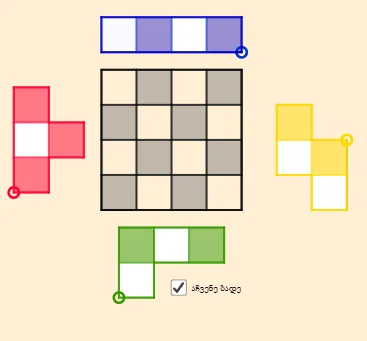
This GeoGebra example demonstrates a geometric construction puzzle: using circles, segments, and polygons, the goal is to fill or cover a square region with specific details such as intersection points, midpoints, and constructed shapes. The core mathematical concepts involve plane geometry, including polygons, circles, midpoints, segments, and their intersections, along with logical reasoning and combinatorial thinking. The construction uses GeoGebra commands such as Intersect to find intersection points, Polygon to create polygons, Midpoint to locate midpoints, Segment to draw segments, Point to mark key points, and Circle to draw circles. Objects include points A, B, poly1, lines f, g, h, i, points C through S, and multiple polygons and circles. This example is suitable for upper secondary or early university students, useful for exploring geometric construction feasibility, enhancing spatial reasoning and logical deduction, and serving as material for math competitions or recreational mathematics.
GeoGebra Commands & Parameters
Intersect(xAxis, yAxis) → APolygon(A, B, 4) → poly1, f, g, h, i, C, DMidpoint(D, A) → EMidpoint(A, B) → FMidpoint(B, C) → GMidpoint(C, D) → HMidpoint(H, D) → IMidpoint(D, E) → JMidpoint(E, A) → KMidpoint(A, F) → LMidpoint(F, B) → MMidpoint(B, G) → NMidpoint(G, C) → OMidpoint(C, H) → PSegment(I, L) → jSegment(H, F) → kSegment(P, M) → lSegment(J, O) → mSegment(E, G) → nSegment(K, N) → pPolygon(A, L, 4) → poly2, q, r, s, t, Q, RPolygon(F, M, 4) → poly3, a, b, c, d, S, TPolygon(Q, T, 4) → poly4, e, f_1, g_1, h_1, U, VPolygon(E, V, 4) → poly5, i_1, j_1, k_1, l_1, W, ZPolygon(I, W, 4) → poly6, m_1, n_1, p_1, q_1, A_1, B_1Polygon(A_1, U, 4) → poly7, r_1, s_1, t_1, a_1, C_1, D_1Polygon(C_1, S, 4) → poly8, b_1, c_1, d_1, e_1, E_1, F_1Polygon(P, D_1, 4) → poly9, f_2, g_2, h_2, i_2, G_1, H_1Point(Circle[I_1, 2]) → J_1Segment(I_1, J_1) → j_2Midpoint(j_2) → K_1Polygon(I_1, K_1, 4) → whiteS2, k_2, l_2, m_2, n_2, L_1, M_1Polygon(K_1, J_1, 4) → poly11, p_2, q_2, r_2, s_2, N_1, O_1Polygon(L_1, N_1, 4) → whiteS1, t_2, a_2, b_2, c_2, P_1, Q_1Polygon(P_1, N_1, 4) → poly13, d_2, e_2, f_3, g_3, R_1, S_1Polygon(I_1, J_1, N_1, R_1, S_1, Q_1, L_1, M_1) → Sborder_0, i_3, j_3, n_3, r_3, s_3, q_3, l_3, m_3Polygon(M_1, I_1, J_1, N_1, R_1, S_1, Q_1, L_1) → Sborder_2, m_4, i_4, j_4, n_4, r_4, s_4, q_4, l_4Segment(L_1, K_1) → h_3Segment(P_1, N_1) → k_3Segment(L_1, N_1) → p_3Point(Circle[T_1, 2]) → U_1Segment(T_1, U_1) → t_3Midpoint(t_3) → V_1Polygon(T_1, V_1, 4) → poly10, a_3, b_3, c_3, d_3, W_1, Z_1Polygon(V_1, U_1, 4) → whiteL1, e_3, f_4, g_4, h_4, A_2, B_2Polygon(Z_1, W_1, 4) → whiteL2, k_4, p_4, t_4, a_4, C_2, D_2Polygon(D_2, C_2, 4) → poly15, b_4, c_4, d_4, e_4, E_2, F_2Polygon(F_2, T_1, U_1, A_2, W_1, E_2) → Lborder_0, f_5, t_5, u_1, a_5, w_1, e_5Segment(D_2, C_2) → g_5Segment(Z_1, W_1) → h_5Segment(W_1, V_1) → i_5Polygon(F_2, T_1, U_1, A_2, W_1, E_2) → Lborder_2, f_6, t_6, u_2, a_6, w_2, e_6Point(Circle[G_2, 3]) → H_2Segment(G_2, H_2) → j_5Circle(G_2, 1) → c_5Circle(H_2, 1) → d_5Intersect(c_5, j_5, 1) → I_2Intersect(d_5, j_5, 1) → J_2Polygon(G_2, I_2, 4) → poly14, k_5, l_5, m_5, n_5, K_2, L_2Polygon(I_2, J_2, 4) → whiteT1, p_5, q_5, r_5, s_5, M_2, N_2Polygon(J_2, H_2, 4) → poly17, b_5, g_6, h_6, i_6, O_2, P_2Polygon(K_2, M_2, 4) → poly18, j_6, k_6, l_6, m_6, Q_2, R_2Polygon(G_2, H_2, O_2, M_2, Q_2, R_2, K_2, L_2) → Tborder_0, g_7, h_7, o_2, m_7, q_6, r_6, k_7, l_7Segment(K_2, I_2) → n_6Segment(K_2, M_2) → p_6Segment(M_2, J_2) → s_6Polygon(G_2, H_2, O_2, M_2, Q_2, R_2, K_2, L_2) → Tborder_2, g_8, h_8, o_1, m_8, q_7, r_7, k_8, l_8Point(Circle[S_2, 4]) → T_2Segment(S_2, T_2) → b_6Midpoint(b_6) → U_2Midpoint(S_2, U_2) → V_2Midpoint(U_2, T_2) → W_2Polygon(S_2, V_2, 4) → whiteI1, c_6, d_6, f_7, i_7, Z_2, A_3Polygon(V_2, U_2, 4) → poly19, j_7, n_7, p_7, s_7, B_3, C_3Polygon(U_2, W_2, 4) → whiteI2, t_7, a_7, b_7, c_7, D_3, E_3Polygon(W_2, T_2, 4) → Iborder_1, d_7, e_7, f_8, i_8, F_3, G_3Polygon(A_3, S_2, T_2, F_3) → Iborder_0, a_8, s_8, t_8, f_9Segment(Z_2, V_2) → j_8Segment(B_3, U_2) → n_8Segment(D_3, W_2) → p_8Polygon(A_3, S_2, T_2, F_3) → Iborder_2, a_9, s_9, t_9, f_{10}
AI Drawing Prompt Reference
Draw a square-like construction on the plane using the intersection of perpendicular coordinate axes as the main reference. Determine an outer set of vertices and then place several consecutive midpoints along the boundary edges. Connect these midpoints with line segments to form internal dividing lines. Using the key points, construct multiple quadrilateral regions step by step and assemble them so they collectively fill the square area in a puzzle-like layout. Include additional points produced from circle constructions at specific intermediate locations, and draw the corresponding connecting segments to create further subdivision borders, resulting in a multi-layer quadrilateral tiling of the square.
The prompt above was compiled from the original drawing commands and is for reference only.