
Classic Cow Grazing Geometry Construction: Arcs and Boundary Optimization
Loading the math board and drawing, please wait…
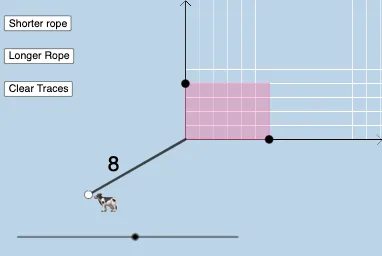
This example demonstrates the geometric construction behind a classic “cow grazing” problem: how to build the relevant boundary shape using circles, circular arcs, rays, and polygonal edges, so that area/perimeter (and often the idea of minimizing the required fencing length) can be visualized and studied. The core math concepts include geometric construction, circle and arc geometry, intersection-based point finding, and representing an admissible grazing/pen boundary via connected polygonal segments and circular arcs. Construction workflow in GeoGebra: Intersect is used to compute key intersection points that anchor the boundary; Polygon connects constructed points into the enclosed outline; Circle creates the fundamental circles; CircleArc selects the arc portions that form the curved boundary; Ray and Segment represent directional constraints and straight boundary parts; Point manages all derived vertices; and Rotate supports symmetric or repeated constructions to build the full configuration from a base pattern. It is intended for secondary-to-university geometry classes, competition-style construction practice, and classroom demonstrations of classic “optimal fencing/boundary” ideas in the grazing problem context.
GeoGebra Commands & Parameters
Intersect(xAxis, yAxis) → CPolygon(C, A, D, B) → q1, c, a, d, bCircle(C, string) → eCircle(C, b) → fCircle(C, string + 1) → hIntersect(h, yAxis, 2) → ECircle(D, string - m - n) → qCircle(A, string - m) → c_1Intersect(e, xAxis, 2) → MRay(A, D) → i_1Intersect(c_1, i_1) → N,CircleArc(A, M, N) → d_1Point(d_1) → ORotate(N, π / 2, D) → N'CircleArc(D, N, N') → e_1Intersect(e, yAxis, 2) → FCircleArc(C, F, M) → gCircle(B, string - n) → kRay(B, D) → lIntersect(k, l, 1) → ICircleArc(B, I, F) → pCircle(D, string - m - n) → tRay(D, A) → f_1Intersect(t, f_1, 1) → KCircleArc(D, K, I) → g_1CircleArc(A, C, K) → p_1Point(p_1) → HRotate((string, 0), If[0 ≤ o ≤ 3, ((-o) * π / 2), ((-3 * π)) / 2], (0, 0)) → QRotate(I, If[4 < o ≤ 5, ((-(o - 4)) * π / 2), (-(π / 2))], D) → I'Rotate(K, If[5 < o ≤ 6, ((-(o - 5)) * π / 2), (-(π / 2))], A) → K'Rotate(M, If[-1 < o ≤ 0, ((-o) * π / 2), π / 2], A) → M'Rotate(N, If[-2 < o ≤ -1, (abs(o + 1) * π / 2), π / 2], D) → N'_{1}Segment(C, Q) → iSegment(C, B) → jRotate(N', If[-3 < o ≤ -2, (abs(o + 2) * π / 2), π / 2], (0, n)) → N''Rotate((0, string), If[3 < o ≤ 4, ((-(o - 3)) * π / 2), (-(π / 2))], (0, n)) → GSegment(B, G) → rSegment(A, M') → sPoint(s) → JSegment(C, J) → h_1Segment(D, I') → j_1Segment(B, D) → k_1Segment(A, D) → l_1Point(h_1) → LSegment(L, M) → m_1Intersect(j, r) → PSegment(P, I) → n_1Segment(D, N'_{1}) → q_1
AI Drawing Prompt Reference
Draw a geometric construction for the classic cow grazing problem, featuring circles, circular arcs, rays, and polygonal edges. Start with a central point at the coordinate origin, then form a quadrilateral by connecting four vertices. Create three concentric circles with different radii around the center, and use their intersections with the axes to define key points. From the vertices, draw rays that intersect the circles to establish boundary points, then construct circular arcs between these points to form curved boundaries. Apply rotations to generate symmetric arcs and points, and finally connect all critical points with line segments to complete the enclosed boundary, adding auxiliary points to illustrate the construction steps.
The prompt above was compiled from the original drawing commands and is for reference only.