
Maximizing Surface Area in an Open Middle Cube (V1)
Loading the math board and drawing, please wait…
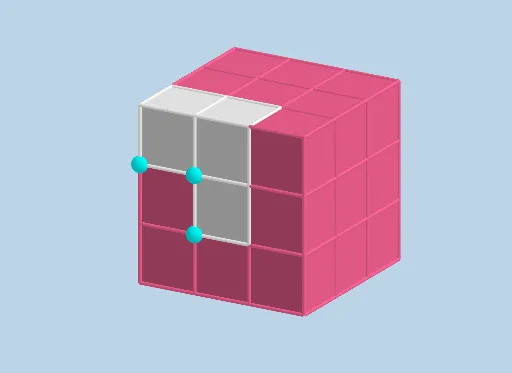
This example demonstrates how to model and maximize the remaining surface area when an “open middle cube” is formed by removing or opening the central portion of a cube. It centers on solid-geometry reasoning: decomposing surface area into faces created by intersections, tracking the edges/regions generated by the cut, and expressing how the total area changes as a geometric parameter varies. The construction links geometry with algebraic optimization, typically leading to quadratic/power-function behavior and supporting slope-based or derivative-based maximum finding. In GeoGebra, the model is built using Point and Cube for the base solid, Translate to shift key points/parts to create the opening, Intersect to compute the resulting intersection points/curves, and Segment to connect the boundary points. The named objects correspond to individual face patches (e.g., face1–face8) and edges (e.g., edge1–edge7), enabling a systematic surface-area assembly. Suitable for advanced high-school learners, contest training, and teaching solid-geometry modeling and optimization.
GeoGebra Commands & Parameters
Point(Circle[(1, 0), Distance[(0, 0), (1, 0)], Segment[(0, 0), (1, 0)]]) → ACube((0, 0), (1, 0), A) → a, B, faceABFE, faceCDEF, edge2, edge1, edge4, edgeAB, edge3, edgeBF, edgeCF, edgeCD, C, edge5, edgeDE, edgeAE, edgeEF, D, E, F, face1, face3, face2, face4Point(Circle[(2, 0), Distance[(1, 0), (2, 0)], Segment[(1, 0), (2, 0)]]) → GCube((1, 0), (2, 0), G) → b, H, faceGHLK, faceIJKL, edge7, edge6, edge9, edgeGH, edge8, edgeHL, edgeIL, edgeIJ, I, edge10, edgeJK, edgeGK, edgeKL, J, K, L, face5, face7, face6, face8Point(Circle[(3, 0), Distance[(2, 0), (3, 0)], Segment[(2, 0), (3, 0)]]) → MCube((2, 0), (3, 0), M) → c, N, faceMNRQ, faceOPQR, edge12, edge11, edge14, edgeMN, edge13, edgeNR, edgeOR, edgeOP, O, edge15, edgePQ, edgeMQ, edgeQR, P, Q, R, face9, face11, face10, face12Translate(a, Vector[(0, 0, 1)]) → a'Translate(c, Vector[(0, 0, 1)]) → c'Translate(c, Vector[(0, 0, 2)]) → c'_{1}Intersect(edge1, zAxis) → SPoint(Segment[(0, 0, 2), (0, -3, 2)]) → TPoint(Circle[T + (1, 0, 0), Distance[T, T + (1, 0, 0)], Segment[T, T + (1, 0, 0)]]) → UCube(T, T + (1, 0, 0), U) → e, V, face17, face18, edgeTV, edge16, edge17, edgeUV, edgeTW, edge20, edge21, edgeWZ, W, edge18, edge22, edge19, edge23, Z, A_1, B_1, face13, face15, face14, face16Point(Segment[(1, 0, 2), (1, -3, 2)]) → C_1Point(Circle[C_1 + (1, 0, 0), Distance[C_1, C_1 + (1, 0, 0)], Segment[C_1, C_1 + (1, 0, 0)]]) → D_1Cube(C_1, C_1 + (1, 0, 0), D_1) → f, E_1, face23, face24, edge25, edge24, edge27, edge29, edge26, edge31, edge33, edge32, F_1, edge28, edge34, edge30, edge35, G_1, H_1, I_1, face19, face21, face20, face22Point(Segment[(1, 0, 1), (1, -3, 1)]) → J_1Point(Circle[J_1 + (1, 0, 0), Distance[J_1, J_1 + (1, 0, 0)], Segment[J_1, J_1 + (1, 0, 0)]]) → K_1Cube(J_1, J_1 + (1, 0, 0), K_1) → g, L_1, face29, face30, edge37, edge36, edge39, edge41, edge38, edge43, edge45, edge44, M_1, edge40, edge46, edge42, edge47, N_1, O_1, P_1, face25, face27, face26, face28Point(Circle[(1, 1, 0), Distance[(0, 1, 0), (1, 1, 0)], Segment[(0, 1, 0), (1, 1, 0)]]) → Q_1Cube((0, 1, 0), (1, 1, 0), Q_1) → d, R_1, face35, face36, edge49, edge48, edge51, edge53, edge50, edge55, edge57, edge56, S_1, edge52, edge58, edge54, edge59, T_1, U_1, V_1, face31, face33, face32, face34Translate(d, Vector[(1, 0)]) → d'Translate(d, Vector[(2, 0)]) → d'_{1}Translate(d, Vector[(0, 1)]) → d'_{2}Translate(d, Vector[(1, 1)]) → d'_{3}Translate(d, Vector[(2, 1)]) → d'_{4}Translate(d, Vector[(0, 0, 1)]) → d'_{5}Translate(d, Vector[(0, 0, 2)]) → d'_{6}Translate(d, Vector[(1, 0, 1)]) → d'_{7}Translate(d, Vector[(2, 0, 1)]) → d'_{8}Translate(d, Vector[(2, 0, 2)]) → d'_{9}Translate(d, Vector[(1, 0, 2)]) → d'_{10}Translate(d, Vector[(0, 1, 1)]) → d'_{11}Translate(d, Vector[(0, 1, 2)]) → d'_{12}Translate(d, Vector[(1, 1, 1)]) → d'_{13}Translate(d, Vector[(1, 1, 2)]) → d'_{14}Translate(d, Vector[(2, 1, 1)]) → d'_{15}Translate(d, Vector[(2, 1, 2)]) → d'_{16}Segment(I, E) → hSegment((0, 0, 2), (0, 1, 2)) → iSegment((0, 1, 2), (0, 1, 3)) → jSegment((0, 1, 3), (1, 1, 3)) → kSegment((0, 1, 2), (1, 1, 2)) → lSegment((0, 0, 2), (1, 0, 2)) → mSegment((1, 1, 3), (2, 1, 3)) → nSegment((2, 0, 3), (2, 1, 3)) → pSegment((2, 0, 3), (2, 0, 2)) → qSegment((1, 1, 3), (1, 1, 2)) → rSegment((2, 1, 2), (1, 1, 2)) → sSegment((1, 0, 2), (1, 0, 1)) → tSegment((2, 0, 2), (2, 0, 1)) → f_1Segment((2, 0, 1), (2, 1, 1)) → g_1Segment((2, 1, 2), (2, 1, 1)) → h_1Segment((2, 1, 2), (2, 1, 3)) → i_1
AI Drawing Prompt Reference
Draw a cube and remove a central portion to create an open middle cube structure. Show the individual faces and edges of the remaining surface, connecting boundary points with lines. Use different colors or styles to distinguish each face and edge. Start by drawing the original cube, then the removed part, and finally connect the boundaries of the remaining structure to visualize the surface of the open middle cube.
The prompt above was compiled from the original drawing commands and is for reference only.