
Midpoint & Endpoint Illustrator (V2): Segment Construction
Loading the math board and drawing, please wait…
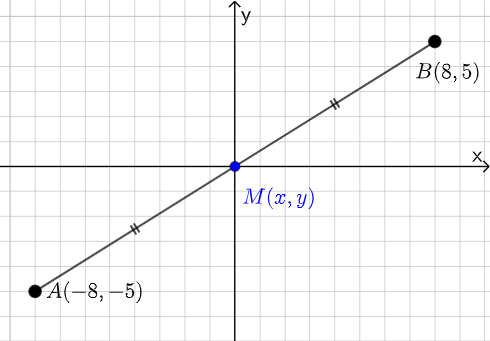
This example illustrates how midpoint and endpoint relationships can be used to construct and analyze a line segment while linking the geometric result to function-graph related elements. Key concepts include segment construction, the idea behind midpoint determination, coordinate geometry for precise point placement, and interpreting geometric points through related function objects. Construction focuses on using GeoGebra commands to define objects: “Segment” to create a segment from its endpoints (e.g., points A and B) and “Midpoint” to compute the midpoint of that segment (creating points such as C). The setup also incorporates function-associated objects (e.g., f, g, h and their related elements) to connect the midpoint location with the broader visual/graph context. Suitable for secondary school geometry, coordinate geometry practice, and learning to combine geometric construction with function visualization.
GeoGebra Commands & Parameters
Segment(A, B) → fMidpoint(f) → CSegment(A, C) → gSegment(C, B) → h
AI Drawing Prompt Reference
Draw a line segment and mark its midpoint. Then, draw two more line segments from the endpoints to the midpoint and to the other endpoint. Ensure the drawing is clear with distinct connections.
The prompt above was compiled from the original drawing commands and is for reference only.