
Line Slope via Run and Rise: Horizontal vs Vertical Change
Loading the math board and drawing, please wait…
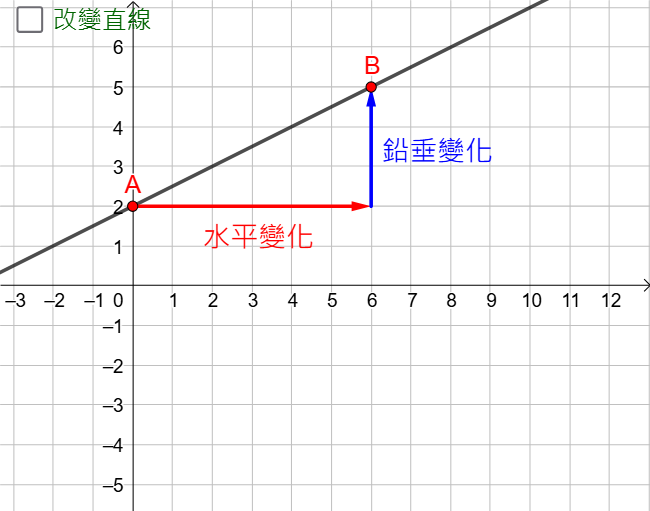
This example visualizes the geometric meaning of a line’s slope by explicitly using the horizontal change (run) and vertical change (rise) between points on the line. It focuses on the slope as a ratio, rooted in coordinate differences (Δx and Δy) and the idea of “difference over division.” The construction combines geometry and vectors: a line is built with Line, key points are placed with Point, and displacement is represented using Vector so that the rise and run correspond to vector components. A Sequence is used to step through intermediate points or updates along the line, while If controls conditional behavior for displaying or computing stepwise results. Text and step-related objects (e.g., showing run/rise and the computed ratio) guide learners through the calculation. Suitable for middle school through early college levels, especially for teaching slope in coordinate geometry and graph-based reasoning.
GeoGebra Commands & Parameters
Line(D, E) → gPoint(g) → BPoint(g) → ALine(A, B) → fSequence(Vector[A + (sgn(x(B) - x(A)) * (i, 0)), A + (sgn(x(B) - x(A)) * (i + 1, 0))], i, 0, abs(x(B) - x(A)) - 1) → l1Sequence(Vector[(x(B), y(A)) + (sgn(y(B) - y(A)) * (0, i)), (x(B), y(A)) + (sgn(y(B) - y(A)) * (0, i + 1))], i, 0, abs(y(B) - y(A)) - 1) → l2If(step1 ∧ b ∧ (GCD[run, rise] ≠ 1 ∨ run < 0 ∨ rise < 0) ∧ IntegerPoints, true, false) → showstep2Vector(A, (x(B), y(A))) → uVector((x(B), y(A)), B) → v
AI Drawing Prompt Reference
Draw a line through points A and B. Generate a sequence of horizontal and vertical vectors on the line to represent the horizontal change (run) and vertical change (rise) from A to B. Use these vectors to show the slope as the ratio of Δx and Δy, and mark key points and vectors on the line to help understand the concept of slope.
The prompt above was compiled from the original drawing commands and is for reference only.