
Rectangle Template: Scaffolded Investigation via Construction & Transformation
Loading the math board and drawing, please wait…
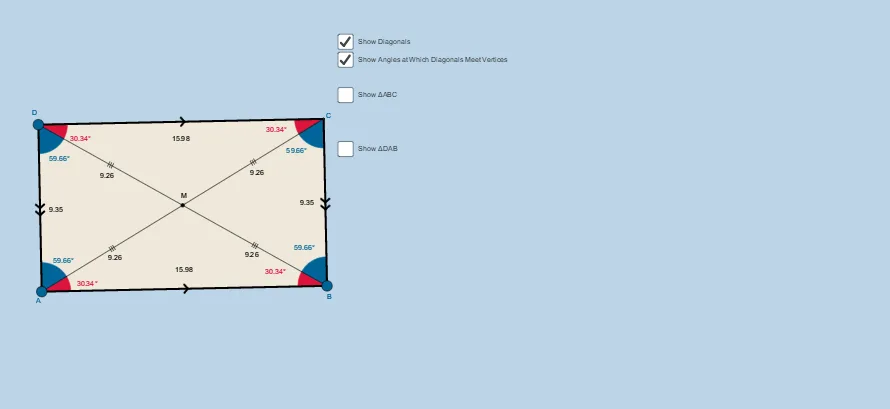
This GeoGebra example uses a scaffolded “rectangle template” workflow to guide learners in constructing rectangles under a consistent geometric/parameter setting, and then verifying the resulting structure via relationships among constructed elements. It emphasizes core plane-geometry ideas: segment/line construction, perpendicular lines, intersection points, angle measurement, midpoint properties, and symmetry (including a transformation-oriented viewpoint that can be related to vectors/complex-number style equivalences). Construction highlights: it builds primitives with Segment, Point, Line, and Polygon; creates supporting perpendiculars using OrthogonalLine; computes key points with Intersect; measures or constrains angles (e.g., α, β, γ, δ) using Angle; defines and uses midpoints through Midpoint (e.g., M); and applies Mirror to generate symmetric counterparts (e.g., points like A′, B′, C′) that form poly_2 alongside poly1. Suitable for high-school advanced geometry, exploratory lessons, and structured GeoGebra template practice to develop geometric modeling and proof-by-configuration skills.
GeoGebra Commands & Parameters
Segment(A, B) → aOrthogonalLine(A, a) → bOrthogonalLine(B, a) → cPoint(b) → DOrthogonalLine(D, b) → dIntersect(c, d) → CSegment(D, A) → eSegment(D, C) → fSegment(C, B) → gAngle(C, B, A) → αAngle(B, A, D) → βAngle(A, D, C) → γAngle(D, C, B) → δMidpoint(D, B) → MSegment(D, M) → hSegment(M, B) → iSegment(A, M) → jSegment(M, C) → kAngle(B, A, M) → εAngle(M, B, A) → ζAngle(D, C, M) → ηAngle(M, D, C) → θAngle(A, D, M) → ιAngle(M, A, D) → κAngle(C, B, M) → λAngle(M, C, B) → μPolygon(A, B, C) → poly1, c_1, a_1, b_1Line(A, C) → nMirror(A, n) → A'Mirror(B, n) → B'Mirror(C, n) → C'Polygon(A', B', C') → poly_2, c', a', b'Polygon(D, A, B) → poly2, b_2, d_1, a_2Mirror(D, a_2) → D'Mirror(A, a_2) → A'_1Mirror(B, a_2) → B'_1Polygon(D', A'_1, B'_1) → poly2', b'_1, d', a'_1Polygon(A, B, C, D) → poly3, a_3, b_3, c_2, d_2Segment(A, C) → qSegment(D, B) → t
AI Drawing Prompt Reference
Draw a rectangle template. First, draw a line segment AB. Then, draw perpendicular lines from A and B, intersecting at point D. Connect D to the midpoint M of AB, and draw a segment from D to C. Measure the angles at AB, AD, DC, and CB, labeling them as alpha, beta, gamma, and delta. Find the midpoint M of D and B, and draw segments from D to M, M to B, A to M, and M to C. Use line AC as a symmetry axis to reflect A, B, and C to get A', B', and C', and draw triangle A'B'C'. Finally, draw quadrilateral ABCD and mark the diagonals AC and DB.
The prompt above was compiled from the original drawing commands and is for reference only.