
Space Curve TNB Frame
Loading the math board and drawing, please wait…
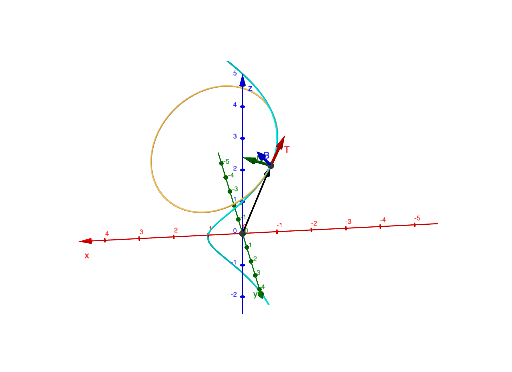
This example demonstrates the TNB (Tangent, Normal, Binormal) frame of a space curve, visualizing how the tangent, normal, and binormal vectors dynamically change as the curve parameter varies. Core mathematical concepts include differential calculus, curvature, unit vector construction, and spatial geometry. Construction involves GeoGebra commands such as CurveCartesian, Vector, Translate, Plane, OrthogonalLine, Circle, and Intersect, built via parametric equations to dynamically render the TNB frame. Suitable for high school calculus introduction or university-level space geometry and multivariable calculus courses, it helps students intuitively grasp the local geometric properties of curves.
GeoGebra Commands & Parameters
CurveCartesian(f(t), g(t), h(t), t, -10, 10) → rCurveCartesian(f'(t), g'(t), h'(t), t, 0, (2 * pi)) → r'Intersect(yAxis, zAxis) → CVector(C, A) → uTranslate(T, u) → T'Translate(B, u) → B'Translate(N, u) → N'Vector(A, B') → vVector(A, N') → nVector(A, T') → tPlane(A, T', N') → pOrthogonalLine(O, p) → iCircle(O, 2, i) → d
AI Drawing Prompt Reference
Draw a space curve with TNB frame, including curve r defined by parametric equations (f(t), g(t), h(t)) from t = -10 to 10. Calculate the tangent r' of curve r from t = 0 to 2π. Find the tangent point C on curve r at t = 0 and use it as the origin to draw the tangent vector u. By translating C and u, obtain points T', B', and N' representing the tangent, normal, and binormal vectors. Use T' and N' to construct plane p and draw a line i orthogonal to plane p. Finally, draw a circle d with radius 2 centered on line i.
The prompt above was compiled from the original drawing commands and is for reference only.