
Slicing a Triangular Pyramid
Loading the math board and drawing, please wait…
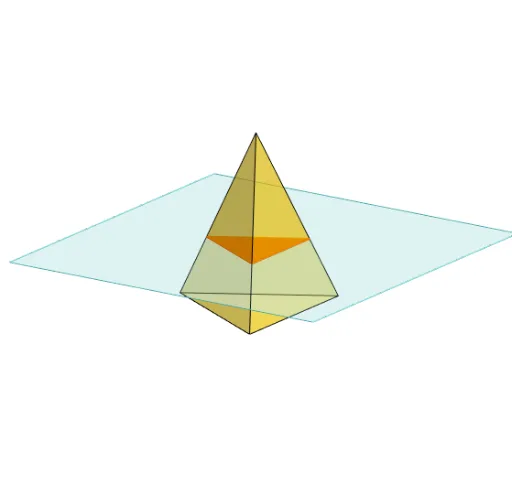
This example demonstrates how to slice a triangular pyramid with a plane and shows the changes in the shape of the cross-section. Key mathematical concepts include solid geometry and geometric construction. It uses commands such as Polygon, PointIn, Translate, Rotate, Pyramid, Plane, IntersectPath, and OrthogonalLine in GeoGebra. Suitable for high school mathematics education and learning.
GeoGebra Commands & Parameters
Polygon(B + (-2, -2), B + (2, -2), B + (2, 2), B + (-2, 2)) → poly3, e, f, g, iPointIn(poly3) → CTranslate((0, 0, 0), Vector[B, C]) → APolygon(A + (-4, -4), A + (4, -4), A + (4, 4), A + (-4, 4)) → poly1, a, b, c, dRotate(Rotate[Translate[poly1, Vector[A, A + (0, 0, h)]], (90° * s), A + (0, 0, h), yAxis], (90° * t), A, zAxis) → poly2Pyramid(Polygon[(-2, 0, 0), Rotate[(-2, 0, 0), 120°, zAxis], Rotate[(-2, 0, 0), (-(120°)), zAxis]], (0, 0, 4)) → m, face1, face2, face3, edge1, edge2, edge3Rotate(D, 120°, (0, 0, 0)) → EPolygon(D, E, 3, xOyPlane) → poly4, j, k, l, FPointIn(poly2) → GPointIn(poly2) → HPointIn(poly2) → IPlane(G, I, H) → nIntersectPath(n, m) → poly6, poly5, r, a_1, b_1, c_1, K, L_1, O, P, J, L, p, qRotate(m, 0, zAxis) → m'Rotate(m, 0, zAxis) → m'_1OrthogonalLine(A, n) → d_1
AI Drawing Prompt Reference
Draw a triangular pyramid by first creating a square-based pyramid, then rotating it around the z-axis to form a triangular pyramid. Select several points on the pyramid to define a plane, and then intersect this plane with the pyramid to observe the shape of the cross-section.
The prompt above was compiled from the original drawing commands and is for reference only.