
Slicing a Rectangular Pyramid Demo
Loading the math board and drawing, please wait…
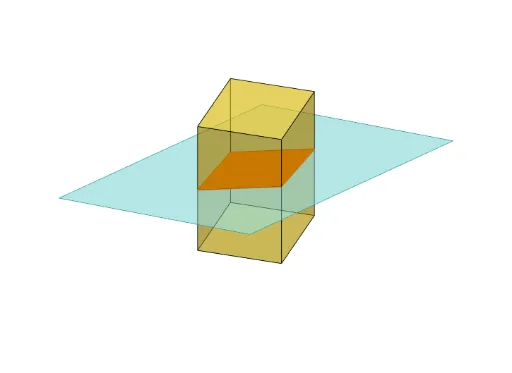
This example demonstrates slicing a rectangular pyramid with various planes to observe the resulting cross-sectional shapes. It involves core math concepts like solid geometry, cross-sectional area calculation, definite integrals, and geometric transformations. Key GeoGebra commands used include Polygon, PointIn, Translate, Rotate, Prism, Plane, IntersectPath, OrthogonalLine for constructing the pyramid model, controlling the slicing plane, and calculating intersection lines. Suitable for high school and above students studying solid geometry, calculus, and geometric constructions.
GeoGebra Commands & Parameters
Polygon(B + (-2, -2), B + (2, -2), B + (2, 2), B + (-2, 2)) → poly3, e, f, g, iPointIn(poly3) → CTranslate((0, 0, 0), Vector[B, C]) → APolygon(A + (-4, -4), A + (4, -4), A + (4, 4), A + (-4, 4)) → poly1, a, b, c, dRotate(Rotate[Translate[poly1, Vector[A, A + (0, 0, h)]], (90° * s), A + (0, 0, h), yAxis], (90° * t), A, zAxis) → poly2Rotate(D, 120°, (0, 0, 0)) → EPrism(Polygon[(-1.5, -1.25, 0), (1.5, -1.25, 0), (1.5, 1.25, 0), (-1.5, 1.25, 0)], (-1.5, -1.25, 4)) → m, M, edge2, edge3, edge4, edge5, edge6, edge7, edge8, N, Q, face1, face2, face3, face4, face5, edge1Polygon(D, E, 3, xOyPlane) → poly4, j, k, l, FPointIn(poly2) → GPointIn(poly2) → HPointIn(poly2) → IPlane(G, I, H) → nIntersectPath(n, m) → poly6, poly5, r, a_1, b_1, c_1, K, L_1, O, P, J, L, p, qRotate(m, 0, zAxis) → m'Rotate(m, 0, zAxis) → m'_1OrthogonalLine(A, n) → d_1