
Slicing a Triangular Prism
Loading the math board and drawing, please wait…
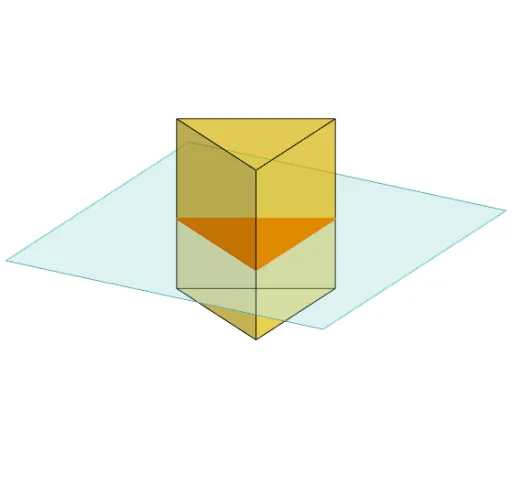
This example demonstrates the process of slicing through a triangular prism to reveal its internal structure. Key math concepts include prisms, polygons, cross-sections, and solid geometry. It utilizes GeoGebra commands like Polygon, PointIn, Translate, Rotate, Prism, Plane, IntersectPath, and OrthogonalLine to construct the model. Suitable for high school solid geometry education, helping students understand cross-sectional properties and spatial reasoning skills.
GeoGebra Commands & Parameters
Polygon(B + (-2, -2), B + (2, -2), B + (2, 2), B + (-2, 2)) → poly3, e, f, g, iPointIn(poly3) → CTranslate((0, 0, 0), Vector[B, C]) → APolygon(A + (-4, -4), A + (4, -4), A + (4, 4), A + (-4, 4)) → poly1, a, b, c, dRotate(Rotate[Translate[poly1, Vector[A, A + (0, 0, h)]], (90° * s), A + (0, 0, h), yAxis], (90° * t), A, zAxis) → poly2Rotate(D, 120°, (0, 0, 0)) → EPolygon(D, E, 3, xOyPlane) → poly4, j, k, l, FPrism(poly4, D + (0, 0, 4)) → m, M, edge4, edge5, edge6, N, face1, face2, face3, face4, edge1, edge2, edge3PointIn(poly2) → GPointIn(poly2) → HPointIn(poly2) → IPlane(G, I, H) → nIntersectPath(n, m) → poly6, poly5, r, a_1, b_1, c_1, K, L_1, O, P, J, L, p, qRotate(m, 0, zAxis) → m'Rotate(m, 0, zAxis) → m'_1OrthogonalLine(A, n) → d_1
AI Drawing Prompt Reference
Draw a triangular prism and slice it with a triangular plane to show its internal structure. Start by drawing a triangular base, then create a point on it and translate it to form a new triangle. Rotate this new shape around the z-axis to create a solid. Next, draw a similar quadrilateral and rotate it around the z-axis to create another solid. Finally, draw a plane between these two solids to show their intersection lines.
The prompt above was compiled from the original drawing commands and is for reference only.