
Exploring Pyramid Cross-Sections
Loading the math board and drawing, please wait…
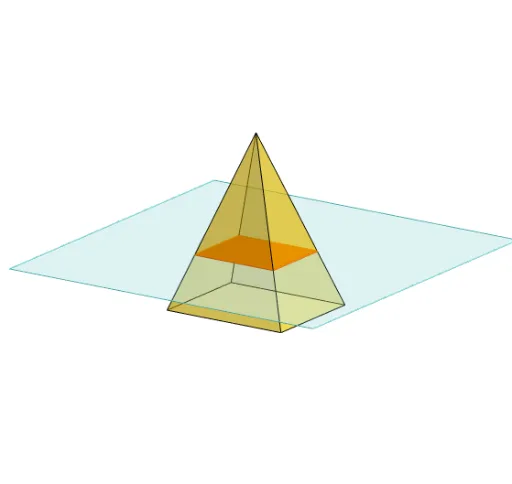
This GeoGebra example demonstrates slicing a pyramid with a plane to generate and analyze cross-sectional polygonal shapes. Core mathematical concepts include solid geometry, planar intersections, and properties of cross-sectional polygons. Construction points extracted from the summary involve GeoGebra commands such as Polygon, PointIn, Translate, Rotate, Pyramid, Plane, IntersectPath, and OrthogonalLine, utilizing key objects like the pyramid solid, slicing plane, intersection points, and face/edge entities. Suitable for high school geometry, early calculus, or spatial reasoning activities focused on 3D visualization and cross-section analysis.
GeoGebra Commands & Parameters
Polygon(B + (-2, -2), B + (2, -2), B + (2, 2), B + (-2, 2)) → poly3, e, f, g, iPointIn(poly3) → CTranslate((0, 0, 0), Vector[B, C]) → APolygon(A + (-4, -4), A + (4, -4), A + (4, 4), A + (-4, 4)) → poly1, a, b, c, dRotate(Rotate[Translate[poly1, Vector[A, A + (0, 0, h)]], (90° * s), A + (0, 0, h), yAxis], (90° * t), A, zAxis) → poly2Pyramid(Polygon[(-1.5, -1.25, 0), (1.5, -1.25, 0), (1.5, 1.25, 0), (-1.5, 1.25, 0)], (0, 0, 4)) → m, face1, face2, face3, face4, edge1, edge2, edge3, edge4Rotate(D, 120°, (0, 0, 0)) → EPolygon(D, E, 3, xOyPlane) → poly4, j, k, l, FPointIn(poly2) → GPointIn(poly2) → HPointIn(poly2) → IPlane(G, I, H) → nIntersectPath(n, m) → poly6, poly5, r, a_1, b_1, c_1, K, L_1, O, P, J, L, p, qRotate(m, 0, zAxis) → m'Rotate(m, 0, zAxis) → m'_1OrthogonalLine(A, n) → d_1