
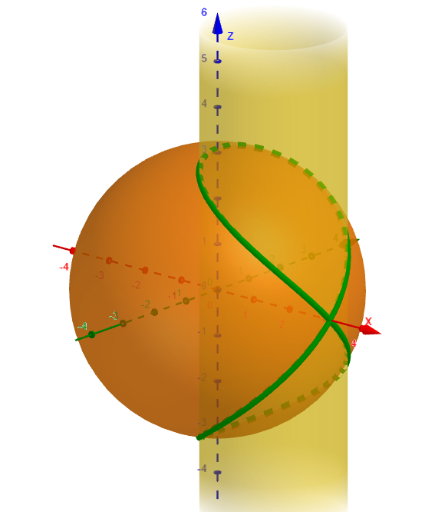
Viviani’s Window: Parametric Curves from a Cylinder–Sphere Intersection
Loading the math board and drawing, please wait…
In collections
History of Maths
This example demonstrates Viviani’s Window by visualizing how a cylinder and a sphere intersect to produce characteristic spatial curves and “window-like” contours. It highlights the geometric relationship of the intersection region, then connects that geometry to the idea of integral calculus (e.g., using integration to relate accumulated quantities such as area/volume). Key concepts include solid geometry (cylinder/sphere intersection), parametric curve modeling, and calculus workflows that combine arithmetic operations with function evaluations such as logarithmic expressions. In GeoGebra, the construction centers on CurveCartesian to create the main curve geometry (objects named testo1, testo2, testo3, testo4). Parameters R, b, c, and d define the geometry, while the variable speed drives or controls the dynamic aspect of the visualization. Suitable for high school to undergraduate students studying solid geometry, coordinate/parametric curve representations, and introductory calculus using interactive visualization.
GeoGebra Commands & Parameters
CurveCartesian(R / 2 + (R / 2 * cos(t)), (R / 2 * sin(t)), (R * sin(t / 2)), t, 0, 12.56637) → dLaTeX(d, false, true) → testo2
AI Drawing Prompt Reference
Create a 3D parametric curve defined for t from 0 to approximately 12.56637, with coordinates x = R/2 + (R/2)·cos(t), y = (R/2)·sin(t), and z = R·sin(t/2). Render this as the main spatial trajectory that visually suggests Viviani’s window, illustrating characteristic curves arising from the intersection geometry between a cylinder and a sphere. After drawing the curve, display its formula in LaTeX alongside the figure.
The prompt above was compiled from the original drawing commands and is for reference only.