
Rotational Symmetry of a Tetrahedron by Šárka Voráčová
Loading the math board and drawing, please wait…
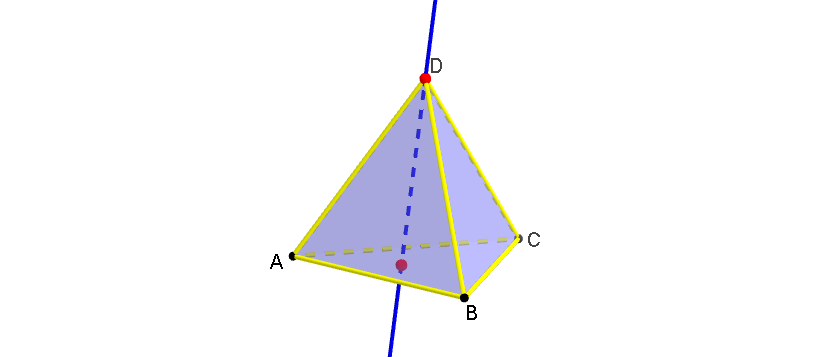
This example demonstrates the rotational symmetry of a tetrahedron. Key mathematical concepts include rotational symmetry and solid geometry. Using GeoGebra commands such as Tetrahedron, Point, Rotate, etc., a tetrahedron is constructed and its rotational symmetry is observed. Suitable for middle school and above students or teachers.
GeoGebra Commands & Parameters
Tetrahedron(A, B, xOyPlane) → a, C, edge4, edge5, edge6, D, face1, face2, face3, face4, edge1, edge2, edge3Point({edge4, edge5, edge6}) → EPointIn(face1) → FCircle(A, B, D) → eCircle(B, C, D) → fCircle(C, A, D) → gCircle(A, B, C) → hCenter(h) → JLine(E, F) → bRotate(face1, (-α), b) → face1'Rotate(face2, (-α), b) → face2'Rotate(face3, (-α), b) → face3'Rotate(face4, (-α), b) → face4'Midpoint(edge6) → KMidpoint(edge5) → LMidpoint(edge4) → MMidpoint(edge2) → NMidpoint(edge1) → OMidpoint(edge3) → P
AI Drawing Prompt Reference
Draw a tetrahedron and demonstrate its rotational symmetry. First, construct the tetrahedron with four vertices and six edges. Then, draw a circle using three adjacent edges and find its center. Next, rotate one face of the tetrahedron around this center and repeat the process for the other three faces. Finally, mark the midpoints of all edges to highlight the symmetry.
The prompt above was compiled from the original drawing commands and is for reference only.