
Pythagorean Ornament Construction
Loading the math board and drawing, please wait…
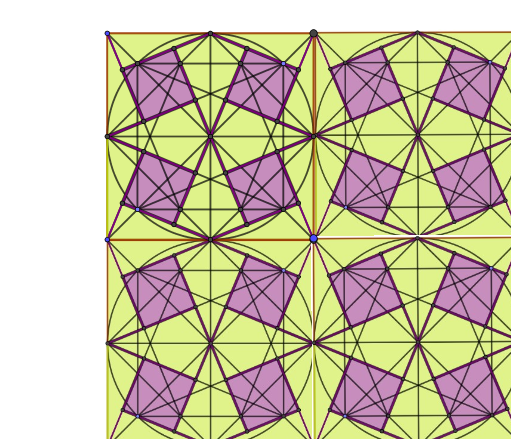
This example demonstrates how to construct an Arab-style geometric ornament using the Pythagorean theorem. It involves core mathematical concepts such as right triangles, midpoints, circles, polygon construction, and geometric transformations. Key GeoGebra commands and objects used include Polygon, Midpoint, Segment, Intersect, Circle, Point, Line, and Ray. Suitable for high school mathematics education to showcase geometric construction techniques and transformation applications.
GeoGebra Commands & Parameters
Polygon(A, B, 4) → mnohoúhelník1, f, g, h, i, C, DMidpoint(A, B) → EMidpoint(C, D) → FMidpoint(D, A) → GMidpoint(B, C) → HSegment(G, H) → jSegment(E, F) → kSegment(A, C) → lSegment(D, B) → mSegment(G, F) → nSegment(F, H) → pSegment(H, E) → qSegment(E, G) → rIntersect(j, k) → ICircle(I, G) → cIntersect(c, l, 1) → JPoint(c) → KSegment(J, K) → sIntersect(c, l, 2) → LSegment(K, L) → tPoint(c) → MSegment(L, M) → aSegment(M, J) → bSegment(G, J) → dSegment(G, M) → eSegment(K, H) → f_1Segment(H, L) → g_1Intersect(r, b) → NIntersect(p, t) → OSegment(N, O) → h_1Intersect(n, b) → PIntersect(q, t) → QSegment(P, Q) → i_1Segment(E, L) → j_1Segment(E, M) → k_1Segment(F, J) → l_1Segment(F, K) → m_1Line(N, O) → n_1Line(P, Q) → p_1Intersect(n_1, d) → RSegment(R, N) → q_1Intersect(p_1, e) → SSegment(P, S) → r_1Intersect(n_1, g_1) → TSegment(T, O) → s_1Intersect(p_1, f_1) → USegment(U, Q) → t_1Segment(A, Q) → a_1Segment(O, D) → b_1Segment(N, B) → c_1Segment(P, C) → d_1Intersect(i_1, l_1) → VIntersect(l_1, b_1) → WSegment(V, W) → e_1Intersect(h_1, k_1) → ZIntersect(k_1, a_1) → A_1Segment(Z, A_1) → f_2Ray(S, M) → g_2Ray(R, J) → h_2Intersect(a_1, h_2) → B_1Segment(J, B_1) → i_2Intersect(b_1, g_2) → C_1Segment(C_1, M) → j_2Segment(C_1, W) → k_2Segment(B_1, A_1) → l_2Intersect(j_1, c_1) → D_1Intersect(i_1, j_1) → E_1Segment(D_1, E_1) → m_2Intersect(m_1, d_1) → F_1Intersect(h_1, m_1) → G_1Segment(F_1, G_1) → n_2Ray(T, L) → p_2Ray(U, K) → q_2Intersect(c_1, q_2) → H_1Segment(D_1, H_1) → r_2Segment(K, H_1) → s_2Intersect(d_1, p_2) → I_1Segment(L, I_1) → t_2Segment(I_1, F_1) → a_2Segment(A_1, E) → b_2Segment(E, D_1) → c_2Segment(W, F) → d_2Segment(F, F_1) → e_2Polygon(B_1, A_1, Z, R) → ct1, f_3, g_3, z_1, r_3Polygon(S, V, W, C_1) → ct2, s_3, v, w, h_3Polygon(G_1, T, I_1, F_1) → ct3, i_3, t_3, j_3, k_3Polygon(D_1, H_1, U, E_1) → ct4, l_3, m_3, u, n_3Polygon(E_1, I, Z, E) → ct5, p_3, i_4, z_2, e_3Polygon(V, I, G_1, F) → ct6, v_1, i_5, q_3, f_4Polygon(I, R, G, S) → ct7, i_6, r_4, g_4, s_4Polygon(I, U, H, T) → ct8, i_7, u_1, h_4, t_4Polygon(E, D_1, B) → t1, b_3, e_4, a_3Polygon(H_1, B, H) → t2, h_5, c_3, b_4Polygon(A, E, A_1) → t3, d_3, a_4, e_5Polygon(A, B_1, G) → t4, g_5, a_5, j_4Polygon(F, F_1, C) → t5, c_4, f_5, k_4Polygon(I_1, C, H) → t6, h_6, l_4, c_5Polygon(D, W, F) → t7, f_6, d_4, w_1Polygon(G, C_1, D) → t8, d_5, g_6, m_4
AI Drawing Prompt Reference
Draw an Arab-style geometric ornament composed of a square and circles. Start by drawing a square, then find the midpoints of its diagonals and use these points as centers to draw circles. Utilize these circles and the square's sides to construct a series of intersecting segments and arcs, forming a complex geometric pattern.
The prompt above was compiled from the original drawing commands and is for reference only.