
Rotating Polyhedra and Functions
Loading the math board and drawing, please wait…
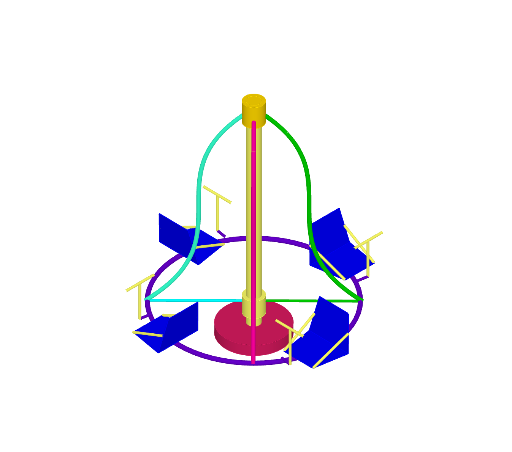
This example demonstrates the dynamic relationship between rotating polyhedra and function graphs during rotation. It involves core math concepts like function graphs, polygon rotation, solid geometry, inequalities, and calculus. Construction highlights the use of commands such as Rotate, Point, Cylinder, Circle, Segment, Plane, OrthogonalPlane, Midpoint, Line, Mirror, Polygon, Center, and Intersect in GeoGebra. Suitable for high school students and math enthusiasts exploring spatial transformations and function properties.
GeoGebra Commands & Parameters
Rotate(g, -90°, yAxis) → g_{1}Rotate(g_{1}, (-α), zAxis) → aRotate(a, -90°, zAxis) → a'Rotate(a, -180°, zAxis) → a'_{1}Rotate(a, -270°, zAxis) → a'_{2}Point(zAxis) → APoint(zAxis) → BCylinder(A, B, 0.2) → b, c, d, eCircle(B, 2.7, zAxis) → hPoint(zAxis) → CCylinder(C, A, 0.3) → f, k, p, iPoint(h) → DRotate(D, (-α), zAxis) → D'Rotate(D', -90°, zAxis) → D''Rotate(D'', -90°, zAxis) → D'''Rotate(D''', -90°, zAxis) → ESegment(E, B) → jSegment(B, D''') → lSegment(B, D'') → mSegment(B, D') → nPoint(zAxis) → FPoint(zAxis) → GPoint(zAxis) → HPoint(zAxis) → ICylinder(H, I, 0.3) → t, c_1, d_1, uPlane(D'', H, F) → p_1OrthogonalPlane(D'', m) → q_1Midpoint(H, B) → KCircle(K, 2.7, zAxis) → e_1Point(e_1) → JSegment(K, J) → f_1OrthogonalPlane(J, f_1) → r_1Line(J, xAxis) → h_1Circle(J, 1.2, h_1) → k_1Point(k_1) → LPoint(f_1) → MMirror(L, r_1) → L'Mirror(M, r_1) → M'Polygon(L, M, M', L') → q1, l_1, m_1, m', l'Rotate(q1, 90°, f_1) → q1'Rotate(q1, -10°, f_1) → q1'_{1}Rotate(L', 90°, f_1) → L''Rotate(L, 90°, f_1) → L'_{1}Rotate(L, -10°, f_1) → L'_{2}Rotate(L', -10°, f_1) → L''_{1}Midpoint(L'_{2}, M) → NMidpoint(L''_{1}, M') → OSegment(N, L'_{1}) → i_1Segment(O, L'') → j_1Rotate(N, 90°, zAxis) → N'Rotate(L'_{1}, 90°, zAxis) → PRotate(O, 90°, zAxis) → O'Rotate(L'', 90°, zAxis) → L'''Rotate(N', 90°, zAxis) → N''Rotate(P, 90°, zAxis) → P'Rotate(O', 90°, zAxis) → O''Rotate(L''', 90°, zAxis) → QRotate(O'', 90°, zAxis) → O'''Rotate(Q, 90°, zAxis) → Q'Rotate(N'', 90°, zAxis) → N'''Rotate(P', 90°, zAxis) → P''Center(c_1) → RCylinder(R, I, 0.3) → v, c_2, d_2, wMidpoint(I, F) → SCylinder(I, S, 0.2) → o, q, r, sCylinder(S, F, 1) → o_1, e_2, g_2, u_1Point(h) → TLine(T, zAxis) → h_2Point(h_1) → ULine(U, h_2) → i_2Point(e_1) → VSegment(V, U) → j_2Point(i_2) → WCircle(W, 0.5, i_2) → k_2Line(W, yAxis) → l_2Intersect(l_2, k_2, 1) → ZIntersect(l_2, k_2, 2) → A_1Segment(W, U) → m_2Segment(Z, A_1) → n_2Rotate(W, 90°, zAxis) → W'Rotate(U, 90°, zAxis) → U'Rotate(Z, 90°, zAxis) → Z'Rotate(A_1, 90°, zAxis) → B_1Rotate(W', 90°, zAxis) → W''Rotate(U', 90°, zAxis) → U''Rotate(V, 90°, zAxis) → V'Rotate(U, 90°, zAxis) → U'_{1}Rotate(Z', 90°, zAxis) → Z''Rotate(B_1, 90°, zAxis) → C_1Rotate(V', 90°, zAxis) → V''Rotate(U'_{1}, 90°, zAxis) → D_1Rotate(W'', 90°, zAxis) → W'''Rotate(U'', 90°, zAxis) → U'''Rotate(Z'', 90°, zAxis) → Z'''Rotate(C_1, 90°, zAxis) → E_1Rotate(V'', 90°, zAxis) → V'''Rotate(D_1, 90°, zAxis) → F_1Rotate(q1'_{1}, (-(α + 45°)), zAxis) → q2Rotate(q1', (-(α + 45°)), zAxis) → q1''Rotate(Z, (-(α + 45°)), zAxis) → Z'_{1}Rotate(A_1, (-(α + 45°)), zAxis) → G_1Segment(Z'_{1}, G_1) → n_1Rotate(W, (-(α + 45°)), zAxis) → W'_{1}Rotate(U, (-(α + 45°)), zAxis) → U'_{2}Segment(W'_{1}, U'_{2}) → s_1Rotate(N, (-(α + 45°)), zAxis) → N'_{1}Rotate(L'_{1}, (-(α + 45°)), zAxis) → H_1Segment(N'_{1}, H_1) → a_1Rotate(O, (-(α + 45°)), zAxis) → O'_{1}Rotate(L'', (-(α + 45°)), zAxis) → L'''_{1}Segment(O'_{1}, L'''_{1}) → b_1Rotate(V, (-(α + 45°)), zAxis) → V'_{1}Rotate(U, (-(α + 45°)), zAxis) → U'_{3}Segment(V'_{1}, U'_{3}) → f_2Rotate(q2, -90°, zAxis) → q2'Rotate(q2, -180°, zAxis) → q2'_{1}Rotate(q2, -270°, zAxis) → q2'_{2}Rotate(q1'', -90°, zAxis) → q1'''Rotate(q1'', -180°, zAxis) → q1'''_{1}Rotate(q1'', -270°, zAxis) → q1'''_{2}Rotate(N'_{1}, -180°, zAxis) → I_1Rotate(H_1, -180°, zAxis) → J_1Segment(I_1, J_1) → t_1Rotate(N'_{1}, -270°, zAxis) → K_1Rotate(H_1, -270°, zAxis) → L_1Segment(K_1, L_1) → p_2Rotate(O'_{1}, -90°, zAxis) → M_1Rotate(L'''_{1}, -90°, zAxis) → N_1Segment(M_1, N_1) → q_2Rotate(O'_{1}, -180°, zAxis) → O_1Rotate(L'''_{1}, -180°, zAxis) → P_1Segment(O_1, P_1) → r_2Rotate(O'_{1}, -270°, zAxis) → Q_1Rotate(L'''_{1}, -270°, zAxis) → R_1Segment(Q_1, R_1) → s_2Rotate(Z'_{1}, -90°, zAxis) → S_1Rotate(G_1, -90°, zAxis) → T_1Segment(S_1, T_1) → t_2Rotate(N'_{1}, -90°, zAxis) → U_1Rotate(H_1, -90°, zAxis) → V_1Segment(U_1, V_1) → a_2Rotate(Z'_{1}, -90°, zAxis) → W_1Rotate(G_1, -90°, zAxis) → Z_1Segment(W_1, Z_1) → b_2Rotate(Z'_{1}, -180°, zAxis) → A_2Rotate(G_1, -180°, zAxis) → B_2Segment(A_2, B_2) → f_3Rotate(Z'_{1}, -270°, zAxis) → C_2Rotate(G_1, -270°, zAxis) → D_2Segment(C_2, D_2) → g_3Rotate(W'_{1}, -90°, zAxis) → E_2Rotate(U'_{2}, -90°, zAxis) → F_2Segment(E_2, F_2) → h_3Rotate(W'_{1}, -180°, zAxis) → G_2Rotate(U'_{2}, -180°, zAxis) → H_2Segment(G_2, H_2) → i_3Rotate(W'_{1}, -270°, zAxis) → I_2Rotate(U'_{2}, -270°, zAxis) → J_2Segment(I_2, J_2) → j_3Rotate(V'_{1}, -90°, zAxis) → K_2Rotate(U'_{3}, -90°, zAxis) → L_2Segment(K_2, L_2) → k_3Rotate(V'_{1}, -180°, zAxis) → M_2Rotate(U'_{3}, -180°, zAxis) → N_2Segment(M_2, N_2) → l_3Rotate(V'_{1}, -270°, zAxis) → O_2Rotate(U'_{3}, -270°, zAxis) → P_2Segment(O_2, P_2) → m_3
AI Drawing Prompt Reference
Create a 3D-style figure showing a rotating polyhedral effect built from circles, segments, cylinders, and a closed polygon. Use the given vertical/space axes as references; place multiple points on the axes to serve as cylinder endpoints, then construct several thin cylinders to represent solid parts. Add circle traces on the space axis (with specified radii) and connect key axis points using segments. Define additional key points by rotating the circle point(s) around the space axis through several angles so they appear in multiple orientations, and use mirror symmetry to produce reflected points. Finally, form a closed polygon from the rotated and mirrored points, and use midpoints plus auxiliary perpendicular planes/sections to draw guiding intersection/segment lines that visually change as the structure rotates.
The prompt above was compiled from the original drawing commands and is for reference only.