
Spherical Region: Geometric and Calculus Integration
Loading the math board and drawing, please wait…
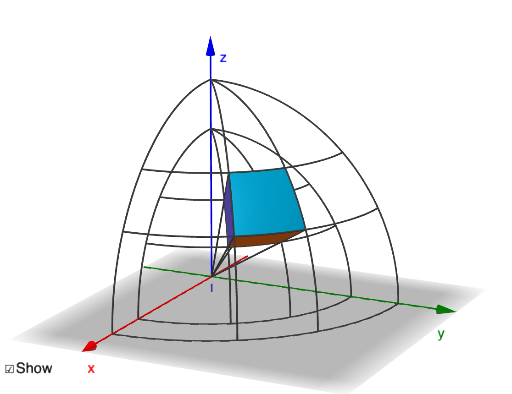
This example demonstrates the integration of spherical regions in geometry and calculus. By constructing spheres, rotating, and calculating distances, it illustrates geometric properties and mathematical concepts. Key concepts include spherical geometry, rotation transformations, and distance calculations. Construction involves GeoGebra commands such as Surface, CurveCartesian, Sphere, Distance, and Rotate. Suitable for high school students or college freshmen for learning solid geometry and calculus fundamentals.
GeoGebra Commands & Parameters
Surface(((rmax * cos(u)) * sin(v)), ((rmax * sin(u)) * sin(v)), (rmax * cos(v)), u, themin, themax, v, phimin, phimax) → FrontSurface(((rmin * cos(u)) * sin(v)), ((rmin * sin(u)) * sin(v)), (rmin * cos(v)), u, themin, themax, v, phimin, phimax) → BackSurface(((r * cos(themax)) * sin(v)), ((r * sin(themax)) * sin(v)), (r * cos(v)), r, rmin, rmax, v, phimin, phimax) → Side1Surface(((r * cos(themin)) * sin(v)), ((r * sin(themin)) * sin(v)), (r * cos(v)), r, rmin, rmax, v, phimin, phimax) → Side2Surface(((r * cos(v)) * sin(phimax)), ((r * sin(v)) * sin(phimax)), (r * cos(phimax)), r, rmin, rmax, v, themin, themax) → Side3Surface(((r * cos(v)) * sin(phimin)), ((r * sin(v)) * sin(phimin)), (r * cos(phimin)), r, rmin, rmax, v, themin, themax) → Side4CurveCartesian((rmax * cos(u)), (rmax * sin(u)), 0, u, 0, π / 2) → hc1CurveCartesian((rmin * cos(u)), (rmin * sin(u)), 0, u, 0, π / 2) → hc2Sphere((0, 0, 0), rmax) → SphDistance(P1, zAxis) → r1p1Distance(P2, zAxis) → r2p2Distance(P3, zAxis) → r3p3Distance(P4, zAxis) → r4p4CurveCartesian((r1p1 * cos(u)), (r1p1 * sin(u)), z(P1), u, 0, π / 2) → hc3CurveCartesian((r2p2 * cos(u)), (r2p2 * sin(u)), z(P2), u, 0, π / 2) → hc4CurveCartesian((r3p3 * cos(u)), (r3p3 * sin(u)), z(P3), u, 0, π / 2) → hc5CurveCartesian((r4p4 * cos(u)), (r4p4 * sin(u)), z(P4), u, 0, π / 2) → hc6Rotate(hc1, ((-π)) / 2, yAxis) → vc1Rotate(hc2, ((-π)) / 2, yAxis) → vc2Rotate(hc1, π / 2, xAxis) → vc3Rotate(hc2, π / 2, xAxis) → vc4Rotate(vc3, themin, zAxis) → vc5Rotate(vc4, themin, zAxis) → vc6Rotate(vc3, themax, zAxis) → vc7Rotate(vc4, themax, zAxis) → vc8Segment(O, P1) → l1Segment(O, P2) → l2Rotate(O, themax - themin, zAxis) → O'Rotate(P1, themax - themin, zAxis) → P1'Segment(Rotate[O, themax - themin, zAxis], Rotate[P1, themax - themin, zAxis]) → l3Rotate(O, themax - themin, zAxis) → O'_{1}Rotate(P2, themax - themin, zAxis) → P2'Segment(Rotate[O, themax - themin, zAxis], Rotate[P2, themax - themin, zAxis]) → l4
AI Drawing Prompt Reference
Draw a sphere centered at the origin with radii rmin and rmax. Use rotation and distance calculations to illustrate the geometric properties and mathematical concepts of the sphere. First, draw two spherical surfaces with different radii. Then, use rotation and distance calculations to show the side and top tangents of the sphere. Finally, use rotation and distance calculations to demonstrate the cross-sections of the sphere at different angles.
The prompt above was compiled from the original drawing commands and is for reference only.