
Interactive 3D Filling Curves and Geometric Transforms
Loading the math board and drawing, please wait…
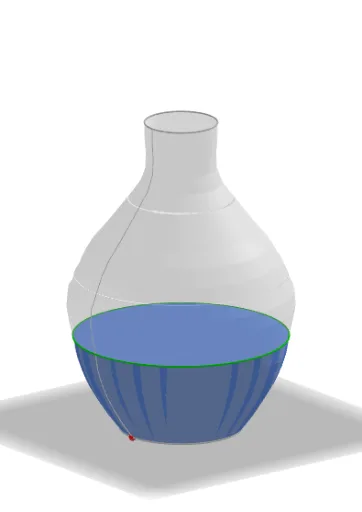
This example demonstrates how to build interactive “filling curves” or filled regions in 3D space, where the shape evolves under geometric transformations. It connects visible curve behavior with core ideas such as curve sketching, the role of tangency/derivative-related change, and how dilation/ratio-like scaling plus 3D transformations (rotation, translation, mirroring) reshape the resulting surface/filled area. Construction-wise, it combines GeoGebra commands such as Line, Point, Mirror, Sequence, PolyLine, Midpoint, Segment, Ellipse, Take, Union, Vector, Translate, Rotate, Surface, Circle, and Element, using structured intermediate objects (e.g., indexed objects like C1…C21 and auxiliary parameters) to generate the 3D filled effect. Suitable for high school through early university students, especially for teaching solid geometry, coordinate geometry, and visualization of concepts related to calculus and curve behavior.
GeoGebra Commands & Parameters
Line(B, yAxis) → ffPoint(a) → C1Point(c_1) → C21Point(b_1) → C20Point(a_1) → C19Point(t) → C18Point(r) → C17Point(q) → C16Point(p) → C15Point(n) → C14Point(m) → C13Point(l) → C12Point(k) → C11Point(j) → C10Point(i) → C9Point(h_1) → C8Point(g) → C7Point(f) → C6Point(e) → C5Point(d) → C4Point(c) → C3Point(b) → C2Mirror(C2, ff) → D2Mirror(C3, ff) → D3Mirror(C4, ff) → D4Mirror(C5, ff) → D5Mirror(C6, ff) → D6Mirror(C7, ff) → D7Mirror(C8, ff) → D8Mirror(C9, ff) → D9Mirror(C10, ff) → D10Mirror(C11, ff) → D11Mirror(C12, ff) → D12Mirror(C13, ff) → D13Mirror(C14, ff) → D14Mirror(C15, ff) → D15Mirror(C16, ff) → D16Mirror(C17, ff) → D17Sequence(abs(x(Object["C" + (t)]) - x(B)), t, 1, 21) → rayonPolyLine(liste1) → sSequence(Element[rayon, k]^(2) + Element[rayon, k + 1]^(2) + (Element[rayon, k] * Element[rayon, k + 1]), k, 1, 20) → volumesSum(volumes) → volumenTSequence(Sum[First[volumeB, k]], k, 1, 21) → volumeAMirror(C18, ff) → D18Mirror(C19, ff) → D19Mirror(C20, ff) → D20Mirror(C21, ff) → D21Sequence(((20 * Element[volumeA, k]), k), k, 1, 21) → pointsMirror(C1, ff) → D1PolyLine(liste2) → d_1Midpoint(C1, D1) → ASequence(Segment[Element[points, k], Element[points, k + 1]], k, 1, 19) → liste3Segment(D1, (10, 0)) → e_1Sequence(Segment[(k, 0), (k, 20)], k, 0, 20) → traitvertiSequence(Segment[(0, k), (20, k)], k, 1, 20) → traithSequence(Segment[Object["D" + (t)], (0, t - 1)], t, 1, 21) → liste4Ellipse(D1, C1, C) → f_1Midpoint(C21, D21) → DEllipse(C21, D21, E) → g_1Sequence(Segment[Element[points, t], (0, t)], t, 1, 21) → liste5Segment((0, 0), Element[points, 1]) → i_1Take(liste5, 1, h - 1) → liste7Take(liste4, 1, h) → liste6Take(points, 1, h - 1) → haut1Take(liste1, 1, h) → rec1Take(liste2, 1, h) → rec2Union(rec1, rec2) → recSequence(Polygon[Element[liste1, i], Element[liste1, i + 1], Element[liste2, i + 1], Element[liste2, i]], i, 1, Length[liste7]) → liste8Ellipse(D1, C1, C) → k_1Ellipse(C21, D21, E) → p_1Segment(Element[liste1, h], Element[points, h - 1]) → hautSequence(G + ((i * AxisStepX[]), 0), i, 0, 20) → liste9Sequence(G + (0, (i * AxisStepY[])), i, 0, 20) → liste10Vector(G, H) → uVector(G, I) → vSequence(Text["" + (i), Element[liste9, i + 1] - (0.2, 0.75)], i, 0, 20) → liste11Take(volumes, 1, h - 1) → volhautSum(volhaut) → VolTake(liste3, 1, h - 2) → liste12Translate(s, Vector[C1, J]) → s'Translate(D1, Vector[C1, J]) → D1'Line(J, D1') → j_1Midpoint(D1', J) → KRotate(s', 90°, j_1) → s''Line(K, zAxis) → l_1Surface(s'', (2 * π), l_1) → oCircle(K, Distance[K, J], l_1) → q_1Take(liste1, 1, h) → liste1bPolyLine(liste1b) → m_1Translate(m_1, Vector[C1, J]) → n_1Rotate(n_1, 90°, j_1) → r_1Surface(r_1, (2 * π), l_1) → wTranslate(C21, Vector[C1, J]) → C21'Rotate(C21', 90°, j_1) → C21''Translate(D21, Vector[C1, J]) → D1'_{1}Rotate(D1'_{1}, 90°, j_1) → LMidpoint(C21'', L) → MCircle(M, Distance[M, L], l_1) → s_1Element(liste1, h) → l1Translate(l1, Vector[C1, J]) → l1'Rotate(l1', 90°, j_1) → l1''Mirror(l1'', l_1) → l1'''Midpoint(l1'', l1''') → NCircle(N, Distance[N, l1''], l_1) → t_1Circle(N, Distance[N, l1''], l_1) → c_2
AI Drawing Prompt Reference
Draw a 3D filled curve passing through points A, B, C, etc., which are mirrored to form D1 to D21. First, create a line ff parallel to the y-axis, then place points A, B, C, etc., on this line, and apply mirror transformations to these points to form the 3D filled area. Finally, calculate the volume of this area.
The prompt above was compiled from the original drawing commands and is for reference only.