
Rotating Ballerina Music Box
Loading the math board and drawing, please wait…
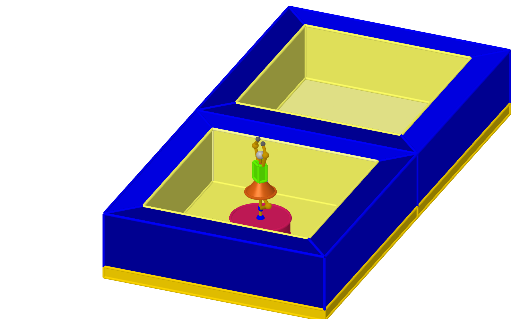
This example demonstrates a rotating ballerina music box. It involves core mathematical concepts such as rotation and solid geometry. Using commands like Polygon, Prism, Mirror, Line, Rotate, Centroid, OrthogonalLine, Point, Cylinder, Intersect, Cone, Sphere, Midpoint, Ray, Segment, a dynamic rotating ballerina model can be constructed. Suitable for high school or university solid geometry and geometric transformations courses.
GeoGebra Commands & Parameters
Polygon(C, G, H, B) → q1, c, g, h, bPolygon(C, G, F, D) → q2, c_1, g_1, f, dPolygon(D, F, E, A) → q3, d_1, f_1, e, aPolygon(E, A, B, H) → q4, e_1, a_1, b_1, h_1Prism(q2, -2) → j, Q, edgeCQ, edgeGR, edgeFS, edgeDT, edgeQR, edgeRS, edgeST, edgeQT, R, S, T, faceCGRQ, faceFGRS, faceDFST, faceCDTQ, faceQRSTPrism(q1, 2) → k, U, edgeCU, edgeGV, edgeHW, edgeBZ, edgeUV, edgeVW, edgeWZ, edgeUZ, V, W, Z, faceCGVU, faceGHWV, faceBHWZ, faceBCUZ, faceUVWZPrism(q4, 2) → l, A_1, edge3, edge1, edge2, edge4, edge5, edge7, edge8, edge6, B_1, C_1, D_1, face2, face1, face3, face4, face5Prism(q3, -2) → m, E_1, edge10, edge12, edge11, edge9, edge13, edge15, edge16, edge14, F_1, G_1, H_1, face8, face9, face7, face6, face10Polygon(F, G, H, E) → q5, f_2, g_2, h_2, e_2Polygon(D, L, I, A) → q6, d_2, l_1, i, a_2Polygon(A, I, J, B) → q7, a_3, i_1, j_1, b_2Polygon(B, J, K, C) → q8, b_3, j_2, k_1, c_2Polygon(K, L, D, C) → q9, k_2, l_2, d_3, c_3Polygon(K, J, I, L) → q10, k_3, j_3, i_2, l_3Mirror(J, p) → J'Mirror(I, p) → I'Mirror(L, p) → L'Mirror(D, p) → D'Mirror(K, p) → K'Mirror(C, p) → C'Mirror(B, p) → B'Mirror(A, p) → A'Line(H_1, C_1) → nRotate(D', ang, n) → D''Rotate(L', ang, n) → L''Rotate(C', ang, n) → C''Rotate(K', ang, n) → K''Rotate(A', ang, n) → A''Rotate(I', ang, n) → I''Rotate(B', ang, n) → B''Rotate(J', ang, n) → J''Polygon(K'', L'', I'', J'') → q11, k'', l'', i'', j''Polygon(L'', D'', A'', I'') → q12, q, d'', a'', rPolygon(K'', C'', D'', L'') → q13, s, c'', t, m_1Polygon(J'', B'', C'', K'') → q14, n_1, b'', p_1, q_1Polygon(I'', A'', B'', J'') → q15, r_1, s_1, t_1, m_2Rotate(E_1, ang, n) → MRotate(U, ang, n) → U'Mirror(G, p) → G'Mirror(F, p) → F'Mirror(H, p) → H'Mirror(E, p) → E'Rotate(H', ang, n) → H''Rotate(E', ang, n) → E''Rotate(G', ang, n) → G''Rotate(F', ang, n) → F''Polygon(C'', G'', H'', B'') → q16, n_2, g'', h'', p_2Prism(q16, -2) → u, J_1, edge20, edge23, edge22, edge21, edge24, edge26, edge27, edge25, K_1, L_1, M_1, face15, face17, face16, face14, face18Polygon(B'', H'', E'', A'') → q17, q_2, r_2, e'', s_2Polygon(F'', E'', A'', D'') → q18, f'', t_2, f_3, g_3Polygon(G'', F'', D'', C'') → q19, h_3, i_3, m_3, n_3Prism(q18, 2) → w, R_1, edge39, edge38, edge37, edge36, edge40, edge42, edge43, edge41, S_1, T_1, U_1, face27, face26, face24, face25, face28Prism(q17, -2) → o_1, V_1, edge45, edge46, edge47, edge44, edge48, edge50, edge51, edge49, W_1, Z_1, A_2, face31, face32, face30, face29, face33Polygon(B, J, K, C) → q20, b_4, j_4, k_4, c_4Polygon(C, K, L, D) → q21, c_5, k_5, l_4, d_4Polygon(D, L, I, A) → q22, d_5, l_5, i_4, a_4Polygon(A, I, J, B) → q23, a_5, i_5, j_5, b_5Polygon(L'', D'', A'', I'') → q24, p_3, q_3, r_3, s_3Polygon(I'', A'', B'', J'') → q25, t_3, e_3, f_4, g_4Polygon(J'', B'', C'', K'') → q26, h_4, m_4, n_4, p_4Polygon(L'', D'', C'', K'') → q27, q_4, r_4, s_4, t_4Centroid(q5) → NOrthogonalLine(N, q5) → e_4Point(e_4) → OCylinder(N, O, 1) → o, e_5, f_5, u_1Point(e_4) → PIntersect(e_4, f_5) → I_1,Point(e_4) → B_2Cylinder(B_2, P, 0.06) → v_1, g_5, h_5, w_1Point(e_4) → C_2Cone(P, C_2, 0.5) → o_2, p_5, u_2Point(e_4) → D_2Point(e_4) → E_2OrthogonalLine(E_2, faceGHWV) → m_5OrthogonalLine(D_2, faceGHWV) → n_5OrthogonalLine(E_2, face4) → q_5OrthogonalLine(D_2, face4) → r_5Point(m_5) → F_2Mirror(F_2, E_2) → G_2OrthogonalLine(F_2, q5) → s_5OrthogonalLine(G_2, q5) → t_5Intersect(n_5, s_5) → H_2Intersect(n_5, t_5) → I_2Polygon(F_2, H_2, I_2, G_2) → q28, f_6, g_6, h_6, i_6Prism(q28, 0.16308498706014124) → w_2, N_2, edge57, edge59, edge60, edge58, edge61, edge63, edge64, edge62, O_2, P_2, Q_2, face37, face39, face38, face36, face40Prism(q28, -0.12477514781668185) → o_3, R_2, edge65, edge67, edge68, edge66, edge69, edge71, edge72, edge70, S_2, T_2, U_2, face42, face44, face43, face41, face45Point(e_4) → J_2Cylinder(J_2, E_2, 0.05) → v_2, c_6, d_6, u_3Sphere(J_2, 0.15) → v_3Midpoint(P, B_2) → K_2OrthogonalLine(P, h_5) → j_6Midpoint(P, K_2) → L_2Midpoint(L_2, B_2) → M_2OrthogonalLine(L_2, face9) → k_6Point(k_6) → V_2Cylinder(P, V_2, 0.06) → w_3, e_6, p_6, o_4Cylinder(M_2, V_2, 0.06) → u_4, q_6, r_6, v_4Point(j_6) → W_2Ray(W_2, G_2) → l_6Ray(W_2, F_2) → m_6Point(t_5) → Z_2Point(l_6) → A_3Segment(A_3, Z_2) → n_6Segment(A_3, G_2) → s_6Rotate(R_2, (-rtt), zAxis) → B_3Rotate(U_2, (-rtt), zAxis) → C_3Rotate(U_2, (-rtt), zAxis) → D_3Rotate(Q_2, (-rtt), zAxis) → E_3Rotate(Q_2, (-rtt), zAxis) → F_3Rotate(N_2, (-rtt), zAxis) → G_3Rotate(S_2, (-rtt), zAxis) → H_3Rotate(S_2, (-rtt), zAxis) → I_3Rotate(T_2, (-rtt), zAxis) → J_3Rotate(T_2, (-rtt), zAxis) → K_3Rotate(P_2, (-rtt), zAxis) → L_3Rotate(O_2, (-rtt), zAxis) → M_3Rotate(A_3, (-rtt), zAxis) → N_3Rotate(G_2, (-rtt), zAxis) → O_3Segment(N_3, O_3) → a_6Rotate(A_3, (-rtt), zAxis) → P_3Rotate(A_3, (-rtt), zAxis) → Q_3Rotate(Z_2, (-rtt), zAxis) → R_3Segment(Q_3, R_3) → b_6Rotate(o_4, (-rtt), zAxis) → o_5Rotate(V_2, (-rtt), zAxis) → S_3Rotate(v_4, (-rtt), zAxis) → w_4Polygon(L_3, J_3, I_3, M_3) → q29, f_7, g_7, h_7, i_7Prism(q29, 0.61) → v_5, Z_3, edge75, edge74, edge73, edge76, edge77, edge79, edge80, edge78, A_4, B_4, C_4, face48, face46, face47, face49, face50Rotate(N_3, 180°, zAxis) → T_3Rotate(O_3, 180°, zAxis) → U_3Segment(T_3, U_3) → j_7Rotate(Q_3, 180°, zAxis) → V_3Rotate(Q_3, 180°, zAxis) → W_3Rotate(R_3, 180°, zAxis) → D_4Segment(W_3, D_4) → k_7Polygon(C'', J_1, U_1, D'') → q30, l_7, m_7, n_7, p_7Prism(q19, 2) → u_5, F_4, edge35, edge52, edge33, edge34, edge53, edge55, edge56, edge54, G_4, H_4, I_4, face34, face22, face21, face23, face35
AI Drawing Prompt Reference
Create a rotating ballerina music box. Start by drawing four rectangles and combining them into two prisms. Then draw four triangles to form another prism. Use mirror and rotate commands to create the rotating effect. Finally, apply mirroring and rotating to generate the rotating ballerina figure.
The prompt above was compiled from the original drawing commands and is for reference only.