
“Rosetón 1” Construction: Using angle and transforms to generate hyperbola-relat
Loading the math board and drawing, please wait…
In collections
Mosaicos - Superficies - Rosetones
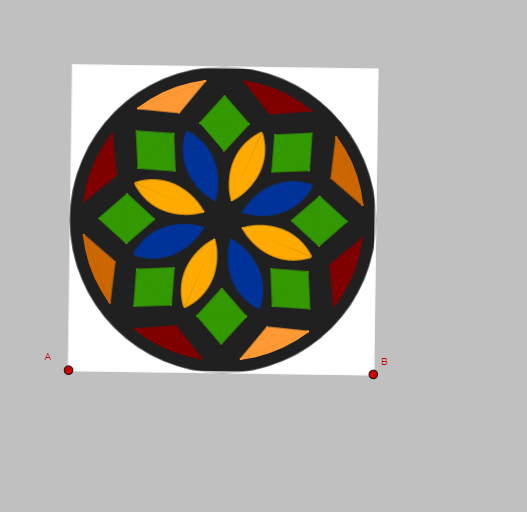
This GeoGebra example demonstrates the “Rosetón 1” geometric configuration: starting from angle constraints and a network of key points, it applies symmetry and rotation to build structured constructions, which then lead to a hyperbola-related curve/trajectory and clear angle relationships. The main mathematical ideas include geometric transformations (Mirror, Rotate), angle construction and angle bisectors (Angle, LineBisector), vector-based direction and orthogonal constructions (Vector, OrthogonalVector, OrthogonalLine), and intersection-based geometry (Line, Intersect). Circles and arcs (Circle, CircleArc) and polygonal scaffolding (Polygon) provide the geometric framework, while CurveCartesian supports rendering the final curve in Cartesian form. From the construction summary, the key workflow is: create direction vectors, derive orthogonal lines, enforce angle/bisector constraints, compute intersections, form circular auxiliary elements, then apply Mirror/Rotate to obtain the rosette-like arrangement, finishing with CurveCartesian to display the resulting curve behavior. Suitable for secondary to early university students, especially for lessons on geometric construction, transformation geometry, and curve visualization.
GeoGebra Commands & Parameters
Vector(A, B) → uOrthogonalVector(u) → vPolygon(A, B, 4) → poly1, n, r, t, a, N, OPointIn(poly1) → Puntopoly1Centroid(poly1) → CPointIn(poly1) → DCircle(C, D) → cLineBisector(A, B) → fOrthogonalLine(C, f) → gLineBisector(F, G) → hIntersect(f, h) → LMirror(M, f) → M'LineBisector(M, G) → iIntersect(eq1, i) → PPolygon(M, F, M') → t1, m', m, f_1Rotate(M, 45°, C) → M'_{1}Rotate(F, 45°, C) → F'Rotate(M', 45°, C) → M''Polygon(M'_{1}, F', M'') → t1', m'', m'_{1}, f'Rotate(M'_{1}, 45°, C) → QRotate(F', 45°, C) → F''Rotate(M'', 45°, C) → M'''Polygon(Q, F'', M''') → t1'', m''', q, f''Mirror(M, g) → M'_{2}Mirror(F, g) → F'_{1}Mirror(M', g) → M''_{1}Polygon(M'_{2}, F'_{1}, M''_{1}) → t1'_{1}, m''_{1}, m'_{2}, f'_{1}Mirror(Q, C) → Q'Mirror(F'', C) → F'''Mirror(M''', C) → RPolygon(Q', F''', R) → t1''', r_1, q', f'''Rotate(Q', 45°, C) → Q''Rotate(F''', 45°, C) → SRotate(R, 45°, C) → R'Polygon(Q'', S, R') → t2, r', q'', sRotate(Q', -45°, C) → Q''_{1}Rotate(F''', -45°, C) → TRotate(R, -45°, C) → R'_{1}Polygon(Q''_{1}, T, R'_{1}) → t3, r'_{1}, q''_{1}, t_1Mirror(Q''_{1}, f) → UMirror(T, f) → T'Mirror(R'_{1}, f) → VPolygon(U, T', V) → t3', v_1, u_1, t'Rotate(E, 8°, C) → E'Rotate(E', 30°, C) → E''Rotate(E'', 15°, C) → E'''Rotate(E''', 30°, C) → KLineBisector(E'', E') → jIntersect(j, g_1) → WCircleArc(C, E', E'') → e_1Polygon(E'', W, E') → t4, l, b, wRotate(E'', 45°, C) → E'''_{1}Rotate(W, 45°, C) → W'Rotate(E', 45°, C) → E''_{1}Polygon(E'''_{1}, W', E''_{1}) → t4', h_1, e'''_{1}, w'Mirror(E', f) → E''_{2}Mirror(E'', f) → E'''_{2}Segment(E''_{2}, E'''_{2}) → w'_{1}Mirror(E'', f) → E'''_{3}Mirror(W, f) → W'_{1}Mirror(E', f) → E''_{3}Polygon(E'''_{3}, W'_{1}, E''_{3}) → t4'_{1}, e''_{3}, e'''_{3}, i_1Mirror(E'''_{1}, f) → A_1Rotate(e_1, 45°, C) → k_1Mirror(k_1, f) → p_1Mirror(E'''_{1}, f) → B_1Mirror(W', f) → W''Mirror(E''_{1}, f) → C_1Polygon(B_1, W'', C_1) → t4'', j_1, b_1, l_1Mirror(e_1, f) → q_1Mirror(e_1, g) → s_1Mirror(s_1, f) → c_2Mirror(k_1, g) → d_2Mirror(d_2, f) → e_2Mirror(E'''_{1}, g) → D_1Mirror(W', g) → W''_{1}Mirror(E''_{1}, g) → oPolygon(D_1, W''_{1}, o) → t4''_{1}, m_1, n_1, w''_{1}Mirror(E'''_{1}, C) → F_1Mirror(W', C) → W''_{2}Mirror(E''_{1}, C) → G_1Polygon(F_1, W''_{2}, G_1) → t4''_{2}, a_1, f_2, w''_{2}Mirror(E'''_{3}, g) → H_1Mirror(W'_{1}, g) → I_1Mirror(E''_{3}, g) → J_1Polygon(H_1, I_1, J_1) → t5, g_2, h_2, i_2Mirror(E'', g) → E'''_{4}Mirror(W, g) → W'_{2}Mirror(E', g) → E''_{4}Polygon(E'''_{4}, W'_{2}, E''_{4}) → t4'_{2}, e''_{4}, e'''_{4}, w'_{2}Rotate(K_1, 22.5°, C) → L_1Rotate(L_1, 90°, C) → M_1Line(M'', M) → j_2Angle(D, C, H) → αCurveCartesian(((1 - t)^(3) * N_1) + (((3 * t) * (1 - t)^(2)) * O_1) + (((3 * (1 - t)) * t^(2)) * P_1) + (t^(3) * M_1), t, 0, 1) → o_1Mirror(o_1, j) → w_1Mirror(o_1, f) → a_2Mirror(w_1, f) → b_2Rotate(o_1, 45°, C) → k_2Rotate(w_1, 45°, C) → l_2Mirror(k_2, f) → m_2Mirror(l_2, f) → n_2Mirror(l_2, g) → p_2Mirror(k_2, g) → q_2Mirror(q_2, f) → r_2Mirror(p_2, f) → s_2Mirror(w_1, g) → t_2Mirror(o_1, g) → u_2Mirror(t_2, f) → v_2Mirror(u_2, f) → w_2Polygon(M, G, M') → t6, f_3, m_3, g_3Rotate(M, 45°, C) → M'_{3}Rotate(G, 45°, C) → G'Rotate(M', 45°, C) → M''_{2}Polygon(M'_{3}, G', M''_{2}) → t6', m''_{2}, m'_{3}, g'Rotate(M, 90°, C) → M'_{4}Rotate(G, 90°, C) → G'_{1}Rotate(M', 90°, C) → M''_{3}Polygon(M'_{4}, G'_{1}, M''_{3}) → t6'_{1}, m''_{3}, m'_{4}, g'_{1}Mirror(M, g) → M'_{5}Mirror(G, g) → G'_{2}Mirror(M', g) → M''_{4}Polygon(M'_{5}, G'_{2}, M''_{4}) → t6'_{2}, m''_{4}, m'_{5}, g'_{2}Rotate(M, 135°, C) → M'_{6}Rotate(G, 135°, C) → G'_{3}Rotate(M', 135°, C) → M''_{5}Polygon(M'_{6}, G'_{3}, M''_{5}) → t6'_{3}, m''_{5}, m'_{6}, g'_{3}Rotate(M, -45°, C) → M'_{7}Rotate(G, -45°, C) → G'_{4}Rotate(M', -45°, C) → M''_{6}Polygon(M'_{7}, G'_{4}, M''_{6}) → t6'_{4}, m''_{6}, m'_{7}, g'_{4}Rotate(M, -90°, C) → M'_{8}Rotate(G, -90°, C) → G'_{5}Rotate(M', -90°, C) → M''_{7}Polygon(M'_{8}, G'_{5}, M''_{7}) → t6'_{5}, m''_{7}, m'_{8}, g'_{5}Rotate(M, -135°, C) → M'_{9}Rotate(G, -135°, C) → G'_{6}Rotate(M', -135°, C) → M''_{8}Polygon(M'_{9}, G'_{6}, M''_{8}) → t6'_{6}, m''_{8}, m'_{9}, g'_{6}
AI Drawing Prompt Reference
Describe a rosette-shaped figure generated by symmetry and rotation transformations, containing a central point, multiple symmetric points, line segments, and a circle, with a hyperbola trajectory displayed. The figure is constructed by creating direction vectors, orthogonal vectors, angle bisectors, and circles, then applying mirror and rotation operations to generate points and connect them, forming a rosette arrangement. The curve part shows the characteristics of a hyperbola trajectory.
The prompt above was compiled from the original drawing commands and is for reference only.