
Rosetón Sketch: Build a Rosette via Rotation and Reflection
Loading the math board and drawing, please wait…
In collections
Mosaicos - Superficies - Rosetones
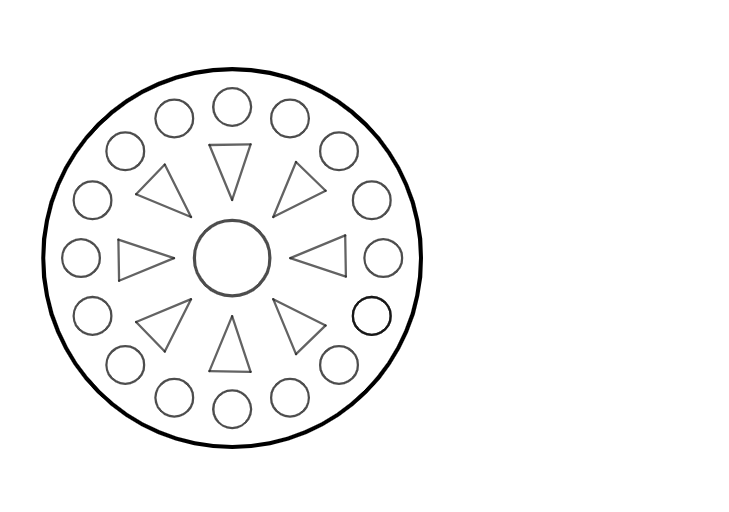
This example demonstrates how to construct a rosette-like sketch using circle intersection points together with geometric transformations. The key ideas include circle geometry (finding intersection points), constructing polygons by connecting points, and generating repeated, symmetric patterns via Rotation (Rotate) and Reflection/Mirroring (Mirror). In GeoGebra, it uses Intersect to compute points from circle/line configurations, Circle to create the base circles, and Point to place the construction points. These points are then connected with Polygon to form the visible polygonal segments of the design. The pattern is expanded by applying Rotate and Mirror to the base configuration, producing multiple rotated and mirrored copies (e.g., original vertices such as A, B, C, D and their transformed counterparts). Suitable for middle/high school geometry enrichment, classroom activities on transformation-based constructions, and student projects on parametric-looking symmetric designs.
GeoGebra Commands & Parameters
Intersect(xAxis, yAxis) → ACircle(A, 1) → cPoint(yAxis) → BPolygon(B, C, D) → t1, d, b, c_1Rotate(B, 45°, A) → B'Rotate(C, 45°, A) → C'Rotate(D, 45°, A) → D'Polygon(B', C', D') → t1', d', b', c'Rotate(B', 45°, A) → B''Rotate(C', 45°, A) → C''Rotate(D', 45°, A) → D''Polygon(B'', C'', D'') → t1'', d'', b'', c''Rotate(B, -45°, A) → B'_{1}Rotate(C, -45°, A) → C'_{1}Rotate(D, -45°, A) → D'_{1}Polygon(B'_{1}, C'_{1}, D'_{1}) → t1'_{1}, d'_{1}, b'_{1}, c'_{1}Rotate(B'_{1}, -45°, A) → ERotate(C'_{1}, -45°, A) → FRotate(D'_{1}, -45°, A) → GPolygon(E, F, G) → t2, g, e, fMirror(B', xAxis) → B''_{1}Mirror(C', xAxis) → C''_{1}Mirror(D', xAxis) → D''_{1}Polygon(B''_{1}, C''_{1}, D''_{1}) → t1''_{1}, d''_{1}, b''_{1}, c''_{1}Mirror(B'_{1}, xAxis) → HMirror(C'_{1}, xAxis) → IMirror(D'_{1}, xAxis) → JPolygon(H, I, J) → t3, j, h, iMirror(B, xAxis) → B'_{2}Mirror(C, xAxis) → C'_{2}Mirror(D, xAxis) → D'_{2}Polygon(B'_{2}, C'_{2}, D'_{2}) → t1'_{2}, d'_{2}, b'_{2}, c'_{2}Point(yAxis) → KRotate(K, 22.5°, A) → K'Circle(K', 0.5) → kRotate(k, 45°, A) → k'Rotate(k', 45°, A) → k''Rotate(k'', 45°, A) → k'''Mirror(k, yAxis) → k'_{1}Mirror(k', yAxis) → k''_{1}Mirror(k'', yAxis) → k'''_{1}Mirror(k''', yAxis) → pRotate(k, 22.5°, A) → k'_{2}Rotate(k', 22.5°, A) → k''_{2}Rotate(k, -22.5°, A) → k'_{3}Rotate(k'', 22.5°, A) → k'''_{2}Mirror(k'_{3}, xAxis) → qMirror(k'_{2}, yAxis) → rMirror(k'', yAxis) → k'''_{3}Mirror(k''_{2}, yAxis) → sMirror(k'''_{2}, yAxis) → tCircle(A, 5) → d_1
AI Drawing Prompt Reference
Start with a unit circle centered at the origin, and place a point on the vertical axis as one vertex of a triangle. Use the intersections of the circle with the axes to define the other two vertices, forming a base triangle. Rotate this triangle around the origin by positive and negative 45 degrees to create multiple rotated copies, then reflect some of these rotated triangles across the horizontal axis to produce a symmetric radial pattern. Next, take another point on the vertical axis, rotate it by 22.5 degrees around the origin to serve as the center of a small circle with radius 0.5. Rotate this small circle around the origin in 45-degree steps, and also mirror it across both the horizontal and vertical axes, resulting in a ring of small circles surrounding the central triangular design. The final figure is a rosette-like pattern with rotational and reflectional symmetry, composed of triangles and circles.
The prompt above was compiled from the original drawing commands and is for reference only.