
The 11th Set of Nets: Rotational Circle Geometry
Loading the math board and drawing, please wait…
In collections
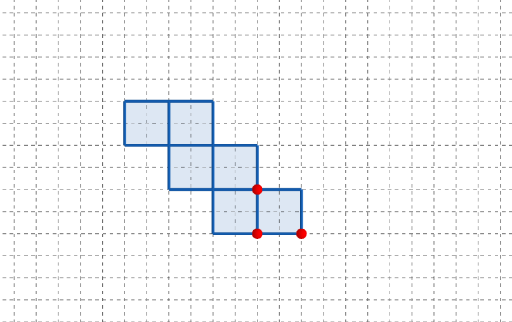
How many nets of a cuboid are there?
This example demonstrates a “nets” style geometric construction by using rotations to generate a structured planar layout. It highlights how points and polygonal connections derived from circular/angle-based relationships move into aligned configurations under controlled transformations. The key mathematical concepts are circle geometry, coordinate geometry, and trigonometry-related angle–position relationships (including the use of parameters that can represent angles or phase-like quantities). Construction is driven by GeoGebra commands Point, Polygon, and Rotate: essential points (A, B, C and parameter-driven points q1–q6, t) are created, polygonal components are formed, and Rotate is used to produce rotated counterparts (q2', q3', q4', q5', q6', t'). Interactive elements such as button1/button2 and a label (text1) support stepwise visualization or switching among sets. Suitable for secondary students and early university learners for lessons on geometric construction, rotational transformations, and trigonometric/coordinate modeling.
GeoGebra Commands & Parameters
Point(Ray[(1, 0), (3, 0)]) → APoint(Ray[A + (1, 0), A + (2, 0)]) → CPoint(Ray[A + (0, 1), A + (0, 2)]) → BPolygon({(0, 0), A, B, (0, y(B))}) → q1Polygon({A, C, (x(C), y(B)), B}) → q2Polygon({((-w), w + h), ((-w), w + h + l), ((-w) - h, w + h + l), ((-w) - h, w + h)}) → q3Polygon({B, B + (0, h), B + ((-l), h), B + ((-l), 0)}) → q4Polygon({((-w), w + h), (0, w + h), (0, w + h + l), ((-w), w + h + l)}) → q5Polygon({(0, w), (0, w + h), ((-w), w + h), ((-w), w)}) → q6Rotate(q4, (90° * t), Line[(0, w), B]) → q4'Rotate(q2, (90° * t), Line[B, A]) → q2'Rotate(Rotate[q6, (90° * t), Line[(0, w), (0, w + h)]], (90° * t), Line[(0, w), B]) → q6'Rotate(Rotate[Rotate[q5, (90° * t), Line[((-w), w + h), (0, w + h)]], (90° * t), Line[(0, w), (0, w + h)]], (90° * t), Line[(0, w), B]) → q5'Rotate(Rotate[Rotate[Rotate[q3, (90° * t), Line[((-w), w + h), ((-w), w + h + l)]], (90° * t), Line[((-w), w + h), (0, w + h)]], (90° * t), Line[(0, w), (0, w + h)]], (90° * t), Line[(0, w), B]) → q3'
AI Drawing Prompt Reference
Create a planar geometric layout generated by rotations. Start with three base points on coordinate axes, forming two rectangular regions. Then construct several rectangles on the right and top, which are rotated by 90 degrees around specific lines (with angle controlled by a parameter) to produce rotated copies, resulting in a net-like symmetric arrangement around a central point. The figure includes multiple polygons interconnected through rotations, demonstrating trigonometric relationships between angles and positions. Add interactive buttons and a text label to switch between different rotation states.
The prompt above was compiled from the original drawing commands and is for reference only.