
Polygon Flower: Rotational Symmetry Pattern
Loading the math board and drawing, please wait…
In collections
Flowers and Polygons -IT
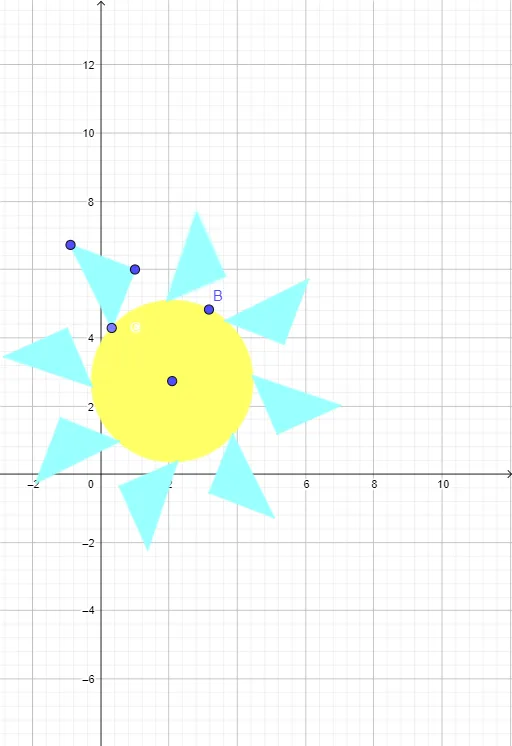
This example demonstrates a flower-like symmetric pattern created by rotating multiple polygons (such as triangles and squares) around a central circle, showcasing the beauty of rotational symmetry and geometric transformations. Core mathematical concepts include rotation, symmetry, polygon properties, and the relationship between the unit circle and trigonometric functions (e.g., the tangent function's potential role in the construction). Construction highlights: using GeoGebra commands such as Circle to create a unit circle, Point to define key points, Polygon to construct base polygons (e.g., isosceles triangles, squares), and Rotate to repeatedly copy polygons at certain angles, generating petal-like arrangements. Objects include points A, B, c, C, D, E, circles, polygons, and rotated copies (e.g., C', D', E'). Suitable for middle and high school students learning geometric transformations, symmetry, and trigonometry applications, as well as for art-mathematics or math visualization teaching to help understand rotational symmetry and periodicity.
GeoGebra Commands & Parameters
Circle(A, B) → cPoint(c) → CPolygon(C, D, E) → t1, e, c_1, dRotate(C, 45°, A) → C'Rotate(C, 45°, A) → C'_{1}Rotate(D, 45°, A) → D'Rotate(E, 45°, A) → E'Polygon(C'_{1}, D', E') → t1', e', c'_{1}, d'Rotate(C'_{1}, 45°, A) → FRotate(D', 45°, A) → D''Rotate(E', 45°, A) → E''Polygon(F, D'', E'') → t1'', e'', f, d''Rotate(F, 45°, A) → F'Rotate(D'', 45°, A) → D'''Rotate(E'', 45°, A) → E'''Polygon(F', D''', E''') → t1''', e''', f', d'''Rotate(F', 45°, A) → F''Rotate(D''', 45°, A) → GRotate(E''', 45°, A) → HPolygon(F'', G, H) → t2, h, f'', gRotate(F'', 45°, A) → F'''Rotate(G, 45°, A) → G'Rotate(H, 45°, A) → H'Polygon(F''', G', H') → t2', h', f''', g'Rotate(F''', 45°, A) → IRotate(G', 45°, A) → G''Rotate(H', 45°, A) → H''Polygon(I, G'', H'') → t2'', h'', i, g''Rotate(I, 45°, A) → I'Rotate(G'', 45°, A) → G'''Rotate(H'', 45°, A) → H'''Polygon(I', G''', H''') → t2''', h''', i', g'''
AI Drawing Prompt Reference
Draw a symmetric pattern resembling a flower formed by rotating multiple polygons like triangles and squares around a central circle, showcasing rotational symmetry and geometric transformations. Start by drawing a unit circle, then create a polygon such as an isosceles triangle or square, and repeatedly rotate and copy it around the center at 45-degree angles to form petal-like arrangements, ultimately creating a flower-like design.
The prompt above was compiled from the original drawing commands and is for reference only.