
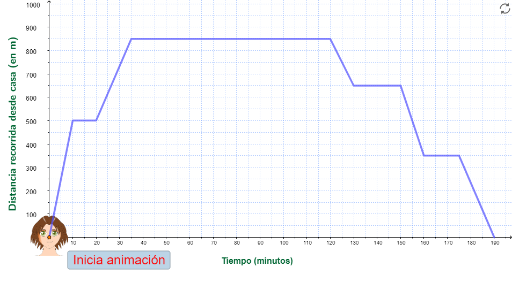
12_4_El trayecto de Adrián
Loading the math board and drawing, please wait…
In collections
Mat 1 ESO - IESO LA PAZ
GeoGebra Commands & Parameters
VerticalText(textoEjeY1) → textoEjeYSequence(Text[(100 * i), (-10, (10 * i) - 1.5)], i, 1, 10) → numejeYPoint(yAxis) → APolyLine(A, B, C, D, E, F, G, H, I, J) → fPoint(f) → PTextfield(a1) → CE1Textfield(a2) → CE2Textfield(a3) → CE3Textfield(a4) → CE4Textfield(a5) → CE5Textfield(a6) → CE6Textfield(a7) → CE7Textfield(a8) → CE8Textfield(a9) → CE9Textfield(a10) → CE10Textfield(d) → DESLSegment((x(P), 0), P) → gSegment((0, y(P)), P) → h
AI Drawing Prompt Reference
Create a coordinate geometry locus demonstration. First, draw a vertical Y-axis with evenly spaced numbers from 100 to 1000 marked along it. Then, draw a polyline path in the coordinate system formed by connecting multiple control points. Next, place a movable point P on this polyline, and draw perpendicular lines from P to both the X-axis and Y-axis, creating projection segments that form a rectangular projection box with P and its foot points on both axes. The entire graphic demonstrates how the coordinates and projections of a moving point change as it moves along the locus.
The prompt above was compiled from the original drawing commands and is for reference only.