
Pyramids to Cube Construction
Loading the math board and drawing, please wait…
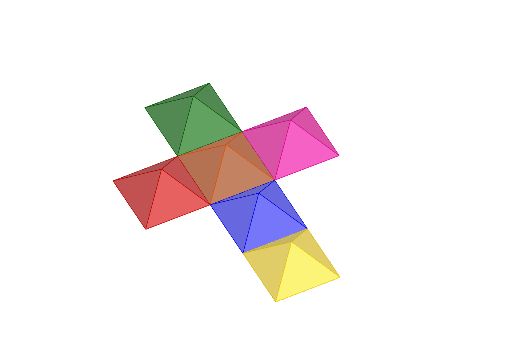
This example demonstrates how to construct a cube by rotating pyramids. Key mathematical concepts include solid geometry, specifically pyramids and cubes. Using GeoGebra commands such as Polygon, Point, Pyramid, Line, and Rotate, the dynamic process of forming a cube from pyramids is illustrated. Suitable for middle school and above students learning solid geometry.
GeoGebra Commands & Parameters
Polygon(A, B, C, D) → q1, a, b, c, dPoint(yAxis) → EPoint(yAxis) → FPolygon(D, E, F, C) → q2, d_1, e, f, c_1Polygon(E, G, H, F) → q3, e_1, g, h, f_1Polygon(G, I, J, H) → q4, g_1, i, j, h_1Point(yAxis) → LPolygon(K, D, E, L) → q5, k, d_2, e_2, lPoint(yAxis) → NPolygon(M, N, F, C) → q6, m, n, f_2, c_2Pyramid(q5, 1) → p, P, faceDKP, faceDEP, faceELP, faceKLP, edgeKP, edgeDP, edgeEP, edgeLPPyramid(q1, 1) → q, Q, faceABQ, faceBCQ, faceCDQ, faceADQ, edgeAQ, edgeBQ, edgeCQ, edgeDQPyramid(q2, -1) → r, R, faceDER, faceEFR, faceCFR, faceCDR, edgeDR, edgeER, edgeFR, edgeCRPyramid(q3, 1) → s, S, faceEGS, faceGHS, faceFHS, faceEFS, edgeES, edgeGS, edgeHS, edgeFSPyramid(q4, 1) → t, T, faceGIT, faceIJT, faceHJT, faceGHT, edgeGT, edgeIT, edgeJT, edgeHTPyramid(q6, 1) → u, U, faceMNU, faceFNU, faceCFU, faceCMU, edgeMU, edgeNU, edgeFU, edgeCULine(C, F) → i_1Line(C, D) → j_1Line(D, E) → k_1Line(E, F) → l_1Rotate(p, α, k_1) → p'Rotate(q, α, j_1) → q'Rotate(u, (-α), i_1) → u'Rotate(s, α, l_1) → s'Rotate(t, α, l_1) → t'Rotate(H, α, l_1) → H'Rotate(G, α, l_1) → G'Line(H', G') → m_1Rotate(t', (-α), m_1) → t''
AI Drawing Prompt Reference
Draw a 3D construction showing multiple pyramids rotating to form a cube. Start with two square bases at different heights, connected by vertical edges. Add several points along the vertical axis as apexes, and build six pyramids on these square or rectangular bases, with some oriented inward. Then rotate the pyramids around the edges of the bases so they gradually fold together into a complete cube. During rotation, some vertices and edges move, and finally all pyramid faces align to form the six faces of the cube. The scene illustrates the transformation from separate pyramids to a unified cube.
The prompt above was compiled from the original drawing commands and is for reference only.