
Pyramid Cross Section
Loading the math board and drawing, please wait…
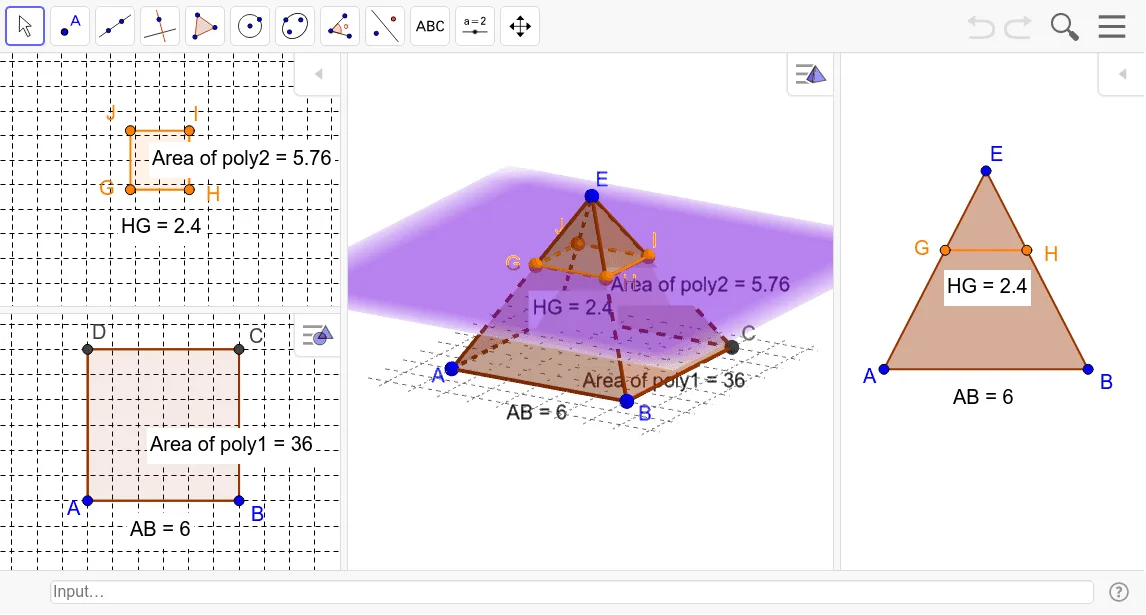
This example demonstrates the cross section of a pyramid. Key mathematical concepts include solid geometry, specifically pyramids and cross sections. Using GeoGebra commands such as PointIn, Polygon, Translate, and IntersectPath, the cross section of a pyramid can be constructed. Suitable for high school solid geometry education or learning.
GeoGebra Commands & Parameters
PointIn(xOyPlane) → BPointIn(xOyPlane) → APolygon(A, B, 4, xOyPlane) → poly1, a, b, c, d, C, DPyramid(poly1, E) → e, faceABE, faceBCE, faceCDE, faceADE, edgeAE, edgeBE, edgeCE, edgeDETranslate(xOyPlane, Vector[(0, 0, 3)]) → fIntersectPath(f, e) → poly2, poly3, g, h, i, j, k, l, m, n, G, H, I, J, K, L, M, NPointIn(poly2) → Pointpoly2PointIn(poly1) → Pointpoly1Distance(A, B) → distanceABDistance(H, G) → distanceHGPerimeter(faceABE) → perimeterfaceABE
AI Drawing Prompt Reference
Draw a pyramid and show its base and a vertical cross section. First, create four points A, B, C, and D on the xy plane, then form a quadrilateral with these points. Next, construct a pyramid with this quadrilateral as the base and point E as the apex. Then, move the xy plane 3 units up along the z-axis to create a new plane f. Find the intersection of the pyramid's base and the new plane to form a new quadrilateral. Finally, select a point from the new quadrilateral and the base, measure the distances between two points on the base and the intersection, and calculate the perimeter of the base triangle.
The prompt above was compiled from the original drawing commands and is for reference only.