
Prisms with Spreadsheet
Loading the math board and drawing, please wait…
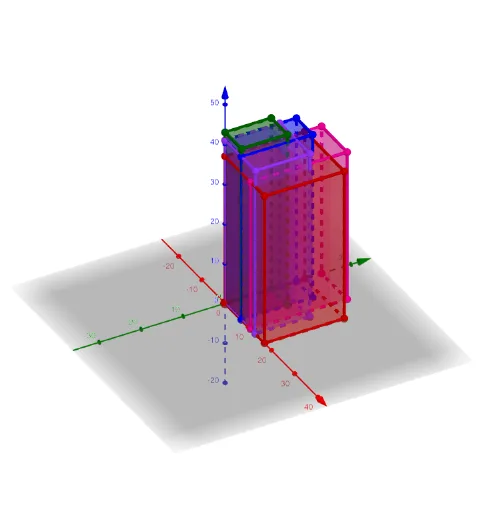
This example demonstrates how to construct prisms using a spreadsheet. It involves polygon and solid geometry concepts. Users can intuitively understand the construction process of prisms through GeoGebra commands like Prism. Suitable for middle school and above students to learn geometric construction and solid geometry.
GeoGebra Commands & Parameters
Prism(D1, E1, F1, G1, H1) → I1, J1, S1, T1, U1, V1, W1, X1, Y1, Z1, AA1, AB1, K1, AC1, AD1, L1, M1, N1, O1, P1, Q1, R1Prism(D2, E2, F2, G2, H2) → I2, J2, S2, T2, U2, V2, W2, X2, Y2, Z2, AA2, AB2, K2, AC2, AD2, L2, M2, N2, O2, P2, Q2, R2Prism(D3, E3, F3, G3, H3) → I3, J3, S3, T3, U3, V3, W3, X3, Y3, Z3, AA3, AB3, K3, AC3, AD3, L3, M3, N3, O3, P3, Q3, R3Prism(D4, E4, F4, G4, H4) → I4, J4, S4, T4, U4, V4, W4, X4, Y4, Z4, AA4, AB4, K4, AC4, AD4, L4, M4, N4, O4, P4, Q4, R4Prism(D5, E5, F5, G5, H5) → I5, J5, S5, T5, U5, V5, W5, X5, Y5, Z5, AA5, AB5, K5, AC5, AD5, L5, M5, N5, O5, P5, Q5, R5
AI Drawing Prompt Reference
Draw five prisms with different sizes, each consisting of a pentagonal base and corresponding sides. First, create five pentagonal bases, then use the prism command with each pentagon and its adjacent vertices as parameters to construct the prisms.
The prompt above was compiled from the original drawing commands and is for reference only.