
Projections of a Cube
Loading the math board and drawing, please wait…
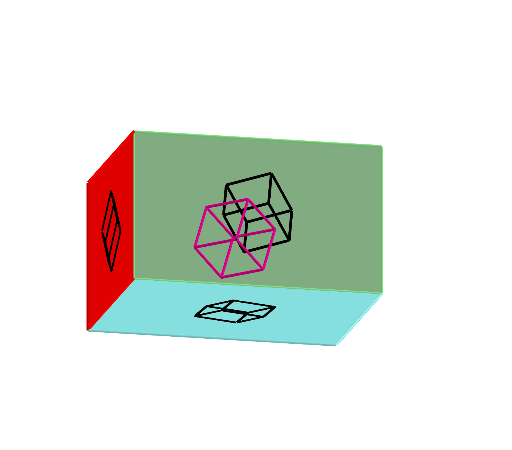
This applet demonstrates the projections of a cube onto three planes. Key mathematical concepts include solid geometry and projection transformations. Using GeoGebra commands such as Point, Cube, Rotate, Vector, Translate, etc., the construction of the cube and its projections is achieved. Suitable for high school or university-level solid geometry studies.
GeoGebra Commands & Parameters
Point(Circle[C, Distance[B, C], Segment[B, C]]) → ACube(B, C, A) → a, D, faceADHG, faceEFGH, edgeBD, edgeBC, edgeAC, edgeAD, edgeBE, edgeDH, edgeEH, edgeEF, E, edgeCF, edgeFG, edgeAG, edgeGH, F, G, H, faceACBD, faceBDHE, faceBCFE, faceACFGRotate(a, (-α), xAxis) → a'Rotate(H, (-α), xAxis) → H'Rotate(E, (-α), xAxis) → E'Rotate(B, (-α), xAxis) → B'Rotate(D, (-α), xAxis) → D'Rotate(A, (-α), xAxis) → A'Rotate(G, (-α), xAxis) → G'Rotate(F, (-α), xAxis) → F'Rotate(C, (-α), xAxis) → C'Rotate(a', (-β), yAxis) → a''Rotate(E', (-β), yAxis) → E''Rotate(B', (-β), yAxis) → B''Rotate(C', (-β), yAxis) → C''Rotate(F', (-β), yAxis) → F''Rotate(H', (-β), yAxis) → H''Rotate(G', (-β), yAxis) → G''Rotate(D', (-β), yAxis) → D''Rotate(A', (-β), yAxis) → A''Rotate(a'', (-γ), zAxis) → a'''Rotate(G'', (-γ), zAxis) → G'''Rotate(F'', (-γ), zAxis) → F'''Rotate(E'', (-γ), zAxis) → E'''Rotate(H'', (-γ), zAxis) → H'''Rotate(B'', (-γ), zAxis) → B'''Rotate(D'', (-γ), zAxis) → D'''Rotate(A'', (-γ), zAxis) → A'''Rotate(C'', (-γ), zAxis) → C'''Vector(K, L) → uTranslate(I, u) → I'Translate(J, u) → J'Vector(K, M) → vTranslate(I, v) → I'_{1}Translate(J, v) → J'_{1}Translate(N, u) → N'Translate(N, v) → N'_{1}Polygon(I'_{1}, J'_{1}, N'_{1}, M) → q1, i'_{1}, j'_{1}, n'_{1}, mPolygon(J', I', I'_{1}, J'_{1}) → q2, j', i', f, gPolygon(I', L, M, I'_{1}) → q3, h, l, m_1, iMidpoint(J, J'_{1}) → OMidpoint(I, I'_{1}) → PMidpoint(K, M) → QSegment(F''', C''') → jSegment(C''', A''') → kSegment(A''', D''') → nSegment(D''', B''') → qSegment(B''', C''') → rSegment(F''', G''') → sSegment(G''', A''') → tSegment(G''', H''') → bSegment(H''', E''') → cSegment(E''', F''') → dSegment(H''', D''') → eSegment(E''', B''') → f_1OrthogonalLine(A''', q1) → pOrthogonalLine(G''', q1) → g_1OrthogonalLine(D''', q1) → h_1OrthogonalLine(H''', q1) → i_1Intersect(h_1, q1) → RIntersect(p, q1) → SIntersect(g_1, q1) → TIntersect(i_1, q1) → USegment(R, U) → j_1Segment(U, T) → k_1Segment(T, S) → l_1Segment(S, R) → n_1OrthogonalLine(B''', q1) → p_1OrthogonalLine(C''', q1) → q_1Intersect(p_1, q1) → VIntersect(q_1, q1) → WSegment(V, W) → r_1Segment(W, S) → s_1Segment(V, R) → t_1OrthogonalLine(E''', q1) → a_1OrthogonalLine(F''', q1) → b_1Intersect(a_1, q1) → ZIntersect(b_1, q1) → A_1Segment(Z, A_1) → c_1Segment(W, A_1) → d_1Segment(V, Z) → e_1Segment(Z, U) → f_2Segment(T, A_1) → g_2OrthogonalLine(G''', q3) → h_2OrthogonalLine(A''', q3) → i_2OrthogonalLine(H''', q3) → j_2OrthogonalLine(D''', q3) → k_2OrthogonalLine(C''', q3) → l_2OrthogonalLine(B''', q3) → m_2OrthogonalLine(E''', q3) → n_2OrthogonalLine(F''', q3) → p_2Intersect(l_2, q3) → B_1Intersect(i_2, q3) → C_1Segment(B_1, C_1) → q_2Intersect(p_2, q3) → D_1Intersect(h_2, q3) → E_1Segment(D_1, E_1) → r_2Segment(E_1, C_1) → s_2Segment(D_1, B_1) → t_2Intersect(k_2, q3) → F_1Intersect(m_2, q3) → G_1Intersect(n_2, q3) → H_1Intersect(j_2, q3) → I_1Segment(F_1, I_1) → a_2Segment(F_1, G_1) → b_2Segment(I_1, H_1) → c_2Segment(H_1, G_1) → d_2Segment(F_1, C_1) → e_2Segment(I_1, E_1) → f_3Segment(H_1, D_1) → g_3Segment(G_1, B_1) → h_3OrthogonalLine(A''', q2) → i_3OrthogonalLine(G''', q2) → j_3OrthogonalLine(D''', q2) → k_3OrthogonalLine(H''', q2) → l_3Intersect(i_3, q2) → J_1Intersect(k_3, q2) → K_1Intersect(l_3, q2) → L_1Intersect(j_3, q2) → M_1Segment(M_1, L_1) → m_3Segment(K_1, L_1) → n_3Segment(J_1, M_1) → p_3Segment(J_1, K_1) → q_3OrthogonalLine(F''', q2) → r_3OrthogonalLine(E''', q2) → s_3OrthogonalLine(C''', q2) → t_3OrthogonalLine(B''', q2) → a_3Intersect(a_3, q2) → N_1Intersect(t_3, q2) → O_1Intersect(r_3, q2) → P_1Intersect(s_3, q2) → Q_1Segment(Q_1, N_1) → b_3Segment(Q_1, P_1) → e_3Segment(Q_1, L_1) → f_4Segment(P_1, M_1) → g_4Segment(N_1, K_1) → h_4Segment(N_1, O_1) → c_3Segment(O_1, J_1) → d_3Segment(P_1, O_1) → i_4
AI Drawing Prompt Reference
Create a 3D cube and depict its projections onto three mutually perpendicular planes. Start by constructing the initial reference points from a circle configuration, then define the cube using three adjacent vertices and obtain all other cube vertices. Rotate the cube around the three coordinate axes in sequence to generate the corresponding projected vertex sets for each plane. Use vectors and translations to shift those projected points so the three projection views appear together clearly. Connect the projected vertices with line segments to form the cube’s edges, and draw polygons to represent the visible faces in each projection. Include the key shared reference points by using segment midpoints to indicate correspondence between projections.
The prompt above was compiled from the original drawing commands and is for reference only.