
Parametric Surfaces
Loading the math board and drawing, please wait…
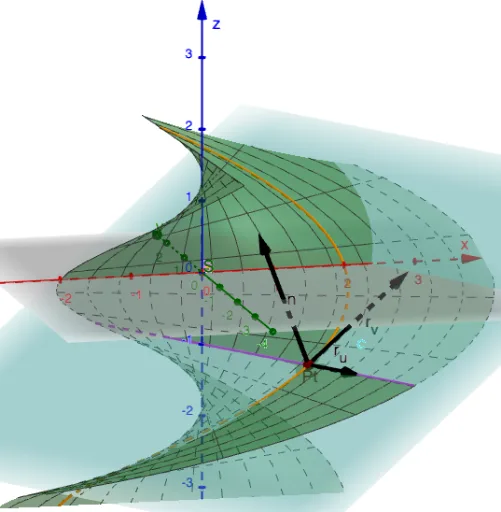
This example demonstrates constructing surfaces using parametric equations and analyzing their geometric properties. Key mathematical concepts include parametric equations, surface equations, and geometric transformations. Construction involves using GeoGebra commands like Surface, CurveCartesian, and OrthogonalPlane to create surface objects, and applying Derivative and Vector for geometric analysis. Suitable for high school students or college undergraduates learning analytic geometry and calculus fundamentals.
GeoGebra Commands & Parameters
Point(xAxis) → APoint(yAxis) → EPoint(yAxis) → CPoint(xAxis) → BPolygon((x(A), y(C)), (x(B), y(C)), (x(B), y(E)), (x(A), y(E))) → D, f, g, h, iSurface(p(u, v), q(u, v), r(u, v), u, x(A), x(B), v, y(C), y(E)) → SCurveCartesian(p(x(P), t), q(x(P), t), r(x(P), t), t, y(C), y(E)) → aSegment((x(P), y(C)), (x(P), y(E))) → jSegment((x(A), y(P)), (x(B), y(P))) → kCurveCartesian(p(t, y(P)), q(t, y(P)), r(t, y(P)), t, x(A), x(B)) → bDerivative(p, x) → pxDerivative(p, y) → pyDerivative(q, x) → qxDerivative(q, y) → qyDerivative(r, x) → rxDerivative(r, y) → ryVector(Pt, Pt + Vector[(px(x(P), y(P)), qx(x(P), y(P)), rx(x(P), y(P)))]) → r_uVector(Pt, Pt + Vector[(py(x(P), y(P)), qy(x(P), y(P)), ry(x(P), y(P)))]) → r_vVector(Pt, Pt + r_u ⊗ r_v) → nOrthogonalPlane(Pt, Vector[r_u ⊗ r_v]) → cTextfield(p) → InputBox1Textfield(q) → InputBox2Textfield(r) → InputBox3Length(n) → dSbydA
AI Drawing Prompt Reference
Draw a surface defined by parametric equations. First, create a rectangular region. Then, define two parametric curves on this region. Next, generate the surface using these curves and analyze its geometric properties, such as the normal vector and surface area.
The prompt above was compiled from the original drawing commands and is for reference only.