
Defining Definite Integral
Loading the math board and drawing, please wait…
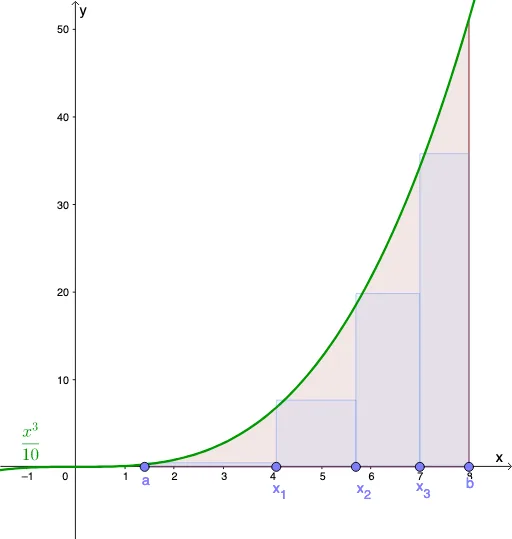
This example demonstrates the process of approximating definite integrals using rectangles. It involves core math concepts like definite integral, upper and lower sums, Riemann sum, parallelogram, percentages, combinatorics, and orthocenter. Constructed with GeoGebra commands and objects such as Point, Integral, Segment, RectangleSum, and Textfield. Suitable for high school and above students learning the definition and calculation of definite integrals.
GeoGebra Commands & Parameters
Point(xAxis) → aPoint(xAxis) → bIntegral(f, x(a), x(b)) → AreaSegment(a, b) → gPoint(g) → x_1Point(g) → x_2Point(g) → x_3RectangleSum(f, x(a), x(x_1), n, s) → Approx1RectangleSum(f, x(x_1), x(x_2), n, s) → Approx2RectangleSum(f, x(x_2), x(x_3), n, s) → Approx3RectangleSum(f, x(x_3), x(b), n, s) → Approx4Textfield(f) → InputBox1
AI Drawing Prompt Reference
In a single coordinate plane, start with a function f and mark the interval endpoints a and b on the x-axis. Indicate the integration span with the segment from a to b, then choose several interior division points along this segment: x_1, x_2, and x_3. Show the definite-integral area from a to b, and approximate that area using rectangle sums over subintervals, forming rectangle-based approximations for the ranges a–x_1, x_1–x_2, x_2–x_3, and x_3–b. Provide a text input area to enter or display the function f.
The prompt above was compiled from the original drawing commands and is for reference only.