
3D Curve Tracing by Lenore Horner
Loading the math board and drawing, please wait…
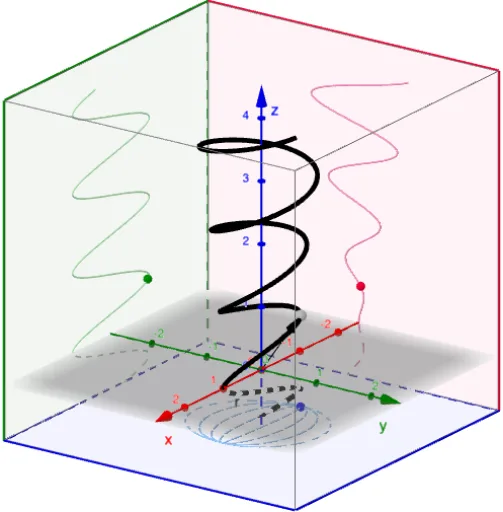
This example demonstrates tracing 3D curves. Key mathematical concepts include parametric equations and curve sketching. It uses commands like CurveCartesian, Vector, and CornerThreeD. Suitable for high school and above students or teachers for teaching and learning.
GeoGebra Commands & Parameters
CurveCartesian(f(u), g(u), h(u), u, t_{min}, t_{max}) → rTextfield(f) → InputBox1Textfield(g) → InputBox2Textfield(h) → InputBox3Textfield(t_{min}) → InputBox4Textfield(t_{max}) → InputBox5Vector((0, 0, 0), A) → rCurrentCornerThreeD(-1, 1) → C1CornerThreeD(-1, 2) → C2CornerThreeD(-1, 3) → C3CornerThreeD(-1, 4) → C4CornerThreeD(-1, 5) → C5CornerThreeD(-1, 6) → C6CornerThreeD(-1, 7) → C7CornerThreeD(-1, 8) → C8Polygon(C1, C4, C8, C5) → yzPlane, c1, c4, c8, c5Polygon(C2, C1, C5, C6) → xzPlane, c2, i, j, c6Polygon(C2, C3, C4, C1) → xyPlane, k, c3, l, mCurveCartesian(f(u), g(u), z(C1), u, t_{min}, t_{max}) → xyProjectionCurveCartesian(f(u), y(C1), h(u), u, t_{min}, t_{max}) → xzProjectionCurveCartesian(x(C1), g(u), h(u), u, t_{min}, t_{max}) → yzProjection
AI Drawing Prompt Reference
Visualize the tracing of a 3D curve using parametric equations, showing projections onto coordinate planes. Include three planes with curves on them, and use sliders to adjust the parameter range. Mark key points to help understand spatial geometry relationships. Start by drawing the basic coordinate planes, then plot the curve and its projections, finally add parameter controls.
The prompt above was compiled from the original drawing commands and is for reference only.