
3D Curve Tracing
Loading the math board and drawing, please wait…
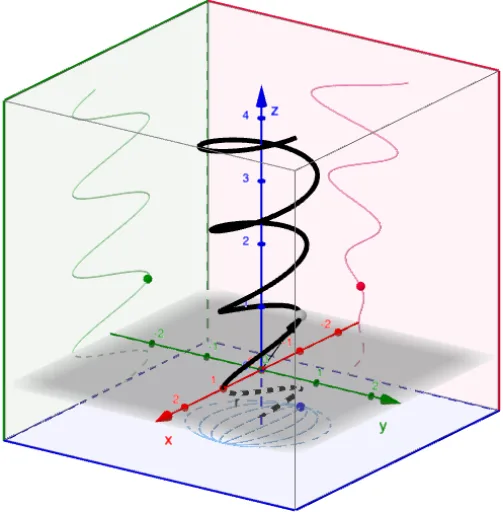
This example demonstrates the tracing of 3D curves. Key mathematical concepts include parametric equations and vectors. Using GeoGebra commands such as CurveCartesian, Vector, and CornerThreeD, complex 3D curves can be constructed. Suitable for high school and above students or teachers.
GeoGebra Commands & Parameters
CurveCartesian(f(u), g(u), h(u), u, t_{min}, t_{max}) → rTextfield(f) → InputBox1Textfield(g) → InputBox2Textfield(h) → InputBox3Textfield(t_{min}) → InputBox4Textfield(t_{max}) → InputBox5Vector((0, 0, 0), A) → rCurrentCornerThreeD(-1, 1) → C1CornerThreeD(-1, 2) → C2CornerThreeD(-1, 3) → C3CornerThreeD(-1, 4) → C4CornerThreeD(-1, 5) → C5CornerThreeD(-1, 6) → C6CornerThreeD(-1, 7) → C7CornerThreeD(-1, 8) → C8Polygon(C1, C4, C8, C5) → yzPlane, c1, c4, c8, c5Polygon(C2, C1, C5, C6) → xzPlane, c2, i, j, c6Polygon(C2, C3, C4, C1) → xyPlane, k, c3, l, mCurveCartesian(f(u), g(u), z(C1), u, t_{min}, t_{max}) → xyProjectionCurveCartesian(f(u), y(C1), h(u), u, t_{min}, t_{max}) → xzProjectionCurveCartesian(x(C1), g(u), h(u), u, t_{min}, t_{max}) → yzProjection
AI Drawing Prompt Reference
Create a 3D diagram showing a traced space curve defined by parametric functions of a parameter u over a chosen interval. Build a reference “corner” configuration that forms three perpendicular planes corresponding to yz, xz, and xy. Then display three projection curves: the original space curve projected onto the xy-plane, onto the xz-plane, and onto the yz-plane, using the same parameter range. Keep the construction consistent so the three planar projections correspond to the evolving position along the 3D curve, illustrating how the curve maps across the orthogonal planes.
The prompt above was compiled from the original drawing commands and is for reference only.