
Parametric Equation of a 3D Line via Vectors
Loading the math board and drawing, please wait…
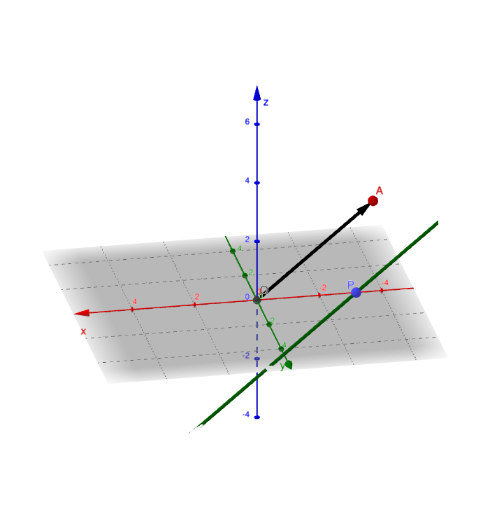
This example demonstrates how to construct and visualize a line in 3D using a parametric equation built from an initial point and a direction vector. The key mathematical ideas are parametric representation, vector form of a line in three-dimensional space, and linear geometric reasoning (turning linear constraints into a drawable locus). In the construction, objects such as A and O serve as reference points, while u provides the direction; a parameter (e.g., d) generates points P on the line, and text labels (text2/text4/text5) annotate important components. Using the GeoGebra commands Intersect and Vector, the model locates required geometric elements (e.g., intersections and vector-based construction steps), and CurveCartesian is used to render the parametric line as a visible curve in 3D. It is intended for learners studying coordinate geometry and solid geometry at the high-school to early-university level, especially when connecting vector methods with parametric equations and 3D graphing.
GeoGebra Commands & Parameters
Intersect(zAxis, xAxis) → OVector(O, A) → uCurveCartesian(x(P) + (x(A) * t), y(P) + (y(A) * t), z(P) + (z(A) * t), t, -30, 30) → d
AI Drawing Prompt Reference
In a 3D coordinate system, start at the origin and draw a line determined by a given direction vector. First, mark the origin as a reference point and display a direction vector pointing from the origin to another point in space. Then, using this direction vector and the starting point, generate points on the line via a parametric equation, and render the line as a continuous curve extending infinitely in both directions. Add text labels to annotate the starting point, the direction vector, and the meaning of the parameter in the equation. The line should be clearly visible, covering a sufficient parameter range to show its orientation.
The prompt above was compiled from the original drawing commands and is for reference only.