
Sphere Demonstration
Loading the math board and drawing, please wait…
In collections
geometriadinamica.es
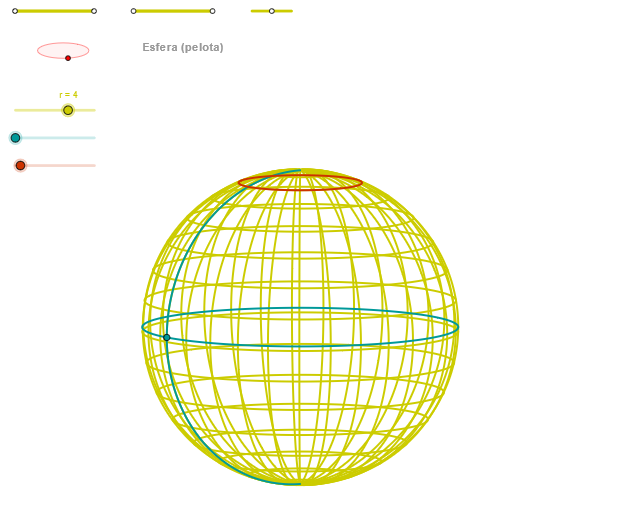
This example demonstrates the 3D geometric shape of a sphere and its intersection with a 2D plane. It involves core mathematical concepts including solid geometry, coordinate geometry, and vector operations. Construction highlights include using GeoGebra commands such as OrthogonalLine, Circle, Intersect, Ellipse, Point, Angle, Segment, CurveCartesian, and Sequence. Suitable for high school and above students learning spatial geometry, parametric equations, and dynamic geometric transformations.
GeoGebra Commands & Parameters
OrthogonalLine(C, yAxis) → zz1Circle(C, 0.62) → zz0Intersect(zz0, zz1, 1) → ZZ1Intersect(zz0, zz1, 2) → ZZ2Ellipse(ZZ1, ZZ2, 0.65) → zElipse1Intersect(zElipse1, zz1) → ZZ5, ZZ6Point(zElipse1) → XYAngle(ZZ6, C, XY) → zAngRotOrthogonalLine(C, xAxis) → zz2Intersect(zz0, zz2, 2) → ZZ3Intersect(zz0, zz2, 1) → ZZ4Ellipse(ZZ3, ZZ4, 0.65) → zElipse2Intersect(zElipse2, zz2) → ZZ7, ZZ8Point(zElipse2) → ZAngle(ZZ8, C, Z) → zAngIncSegment(Q5, Q6) → p5Point(p5) → P5Segment(Q3, Q4) → p2Point(p2) → P3Segment(P3, Q4) → p4Point(p4) → P4Segment(Q1, Q2) → p1Point(p1) → P1Segment(P1, Q2) → p3Point(p3) → P2Segment(ZZ5, ZZ6) → zz4Segment(ZZ7, ZZ8) → zz3Intersect(zElipse2, zElipse1, 1) → zPunto1Intersect(zElipse2, zElipse1, 4) → zPunto2Segment(zPunto1, zPunto2) → zSeg2CurveCartesian((r * (((cos(α) * sin(v)) * sin(zAngRot)) + ((sin(α) * sin(v)) * cos(zAngRot)))), (r * (((((-cos(α)) * sin(v)) * cos(zAngRot)) * sin(zAngInc)) + (((sin(α) * sin(v)) * sin(zAngRot)) * sin(zAngInc)) + (cos(v) * cos(zAngInc)))), v, v1, v2) → curva2CurveCartesian((r * ((cos(u) * sin(zAngRot)) + (sin(u) * cos(zAngRot)))), (r * ((((-cos(u)) * cos(zAngRot)) * sin(zAngInc)) + ((sin(u) * sin(zAngRot)) * sin(zAngInc)))), u, u1, u2) → curva1CurveCartesian((r * (((cos(u) * sin(β)) * sin(zAngRot)) + ((sin(u) * sin(β)) * cos(zAngRot)))), (r * (((((-cos(u)) * sin(β)) * cos(zAngRot)) * sin(zAngInc)) + (((sin(u) * sin(β)) * sin(zAngRot)) * sin(zAngInc)) + (cos(β) * cos(zAngInc)))), u, u1, u2) → a1Sequence(CurveCartesian[(r * (((cos(u) * sin(v)) * sin(zAngRot)) + ((sin(u) * sin(v)) * cos(zAngRot)))), (r * (((((-cos(u)) * sin(v)) * cos(zAngRot)) * sin(zAngInc)) + (((sin(u) * sin(v)) * sin(zAngRot)) * sin(zAngInc)) + (cos(v) * cos(zAngInc)))), v, v1, v2], u, u1, u2, paso) → list2Sequence(CurveCartesian[(r * (((cos(u) * sin(v)) * sin(zAngRot)) + ((sin(u) * sin(v)) * cos(zAngRot)))), (r * (((((-cos(u)) * sin(v)) * cos(zAngRot)) * sin(zAngInc)) + (((sin(u) * sin(v)) * sin(zAngRot)) * sin(zAngInc)) + (cos(v) * cos(zAngInc)))), u, u1, u2], v, v1, v2, paso) → list1
AI Drawing Prompt Reference
Draw a sphere and its intersection with a plane. Start by creating a sphere with center C and radius 0.62, then create two perpendicular lines zz1 and zz2 to the y-axis and x-axis, respectively. Find the intersection points ZZ1 and ZZ2 between the sphere and the lines, and use these points to construct ellipses zElipse1 and zElipse2. Through the intersection points of the ellipses and lines, construct curves curva1, curva2, and a1. Finally, use the sequence command to generate a series of curves list1 and list2, showing the dynamic intersection between the sphere and the plane.
The prompt above was compiled from the original drawing commands and is for reference only.