
Mice Pursuit Problem and Curves
Loading the math board and drawing, please wait…
In collections
The Domain of the Time (intuitive kinematics)
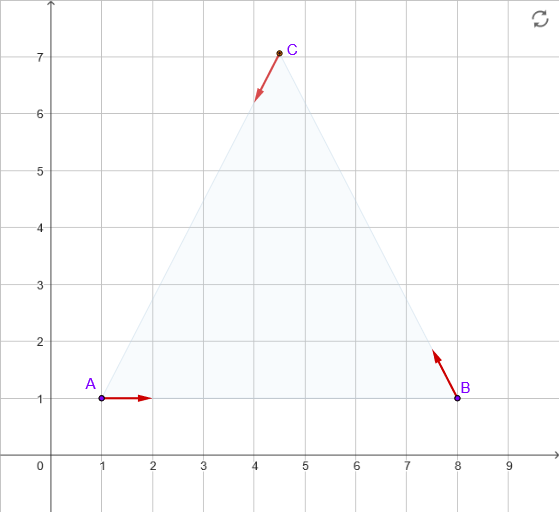
This example demonstrates the pursuit curves in the mice pursuit problem. It involves core mathematical concepts like vectors, parametric equations, coordinate geometry, and kinematics. Key GeoGebra commands used include Rotate, UnitVector, and CurveCartesian, with objects such as t0, t1, M, N, P, vM, vN, vP. It is suitable for high school and above students to understand the application of vector operations, parametric equations, and locus plotting in physical problems.
GeoGebra Commands & Parameters
Rotate(B, pi / 3, A) → CUnitVector(Vector[M, N]) → vMUnitVector(Vector[N, P]) → vNUnitVector(Vector[P, M]) → vPCurveCartesian((1 + 7 / 2, 1 + (7 / 2 * sqrt(3) / 3)) + ((7 / sqrt(3) * ℯ^((sqrt(3) * t))); (-t) - (5 * pi / 6)), t, (-2 * pi), (2 * pi)) → c1CurveCartesian((1 + 7 / 2, 1 + (7 / 2 * sqrt(3) / 3)) + ((7 / sqrt(3) * ℯ^((sqrt(3) * t))); (-t) - pi / 6), t, (-2 * pi), (2 * pi)) → c2CurveCartesian((1 + 7 / 2, 1 + (7 / 2 * sqrt(3) / 3)) + ((7 / sqrt(3) * ℯ^((sqrt(3) * t))); (-t) + pi / 2), t, (-2 * pi), (2 * pi)) → c3
AI Drawing Prompt Reference
Draw the pursuit curves in the mice pursuit problem. Start by creating point A and rotating it 60 degrees to get point C. Then, define points M, N, and P, and calculate their velocity vectors vM, vN, and vP. Finally, plot three parametric curves c1, c2, and c3, which represent the paths of the mice during the pursuit.
The prompt above was compiled from the original drawing commands and is for reference only.