
Tangent Parametrization
Loading the math board and drawing, please wait…
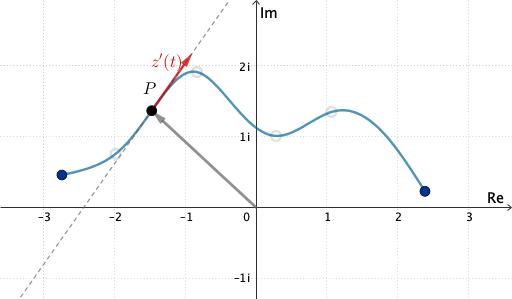
This example demonstrates how to create tangent parametrization using GeoGebra, illustrating the dynamic relationship between tangents and curves. Key math concepts include vectors, parametric equations, derivatives, and coordinate geometry. The construction involves commands like Spline, Vector, Tangent, Circle, and Intersect, highlighting the use of parametric equations in geometric visualization. Suitable for high school and above learners to understand the application of parametric equations in geometry and dynamic visualization.
GeoGebra Commands & Parameters
Spline(L_1, 3) → aVector((0, 0), A) → v1Vector((0, 0), F) → v2Vector((0, 0), G) → v3Tangent(G, a) → fCircle(G, 1) → cIntersect(c, f, 2) → HVector(G, H) → v4
AI Drawing Prompt Reference
On a coordinate plane, first draw a cubic spline curve a. Pick a point G associated with the spline. Through G, construct the tangent line f to the curve a. Next, draw a circle c with center G and radius 1. Intersect the circle c with the tangent f and take the second intersection point H. Finally, draw the vector v4 from G to H, highlighting the direction from G to that intersection while keeping f tangent to the spline at G.
The prompt above was compiled from the original drawing commands and is for reference only.