
Sphere–Plane Intersection: Deriving Parametric Equations in GeoGebra
Loading the math board and drawing, please wait…
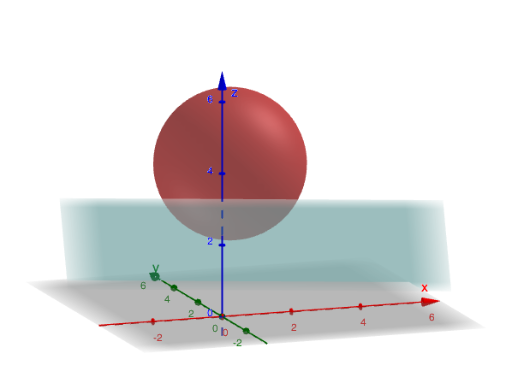
This example demonstrates how to obtain and visualize the parametric equations of the intersection curve formed by a sphere and a plane in GeoGebra. It connects solid geometry with algebraic derivation: starting from the sphere radius and plane coefficients, the intersection is represented as a parameterized path so the curve can be drawn and explored in 3D. The key mathematics includes solid geometry (sphere and plane equations), linear algebra ideas such as matrix diagonalisation to simplify the underlying quadratic structure, and deriving a usable parametric form for the intersection line/curve. Construction-wise, the setup uses GeoGebra’s IntersectPath command to generate the intersection path object, with button1 to trigger the workflow. It relies on defined parameters and objects including x_0, y_0, z_0 (reference/center coordinates), R (sphere radius), A, B, C, D (plane coefficients), S (intermediate geometric quantity), PI (parameter ranges/angle constants), rho (a parameter such as radial/scale variable), and intCur with speed to control how the path is generated or animated. Suitable for high school upper levels and early university analytic/solid geometry instruction and for classroom visualization of geometric modeling.
GeoGebra Commands & Parameters
IntersectPath(PI, S) → intCur
AI Drawing Prompt Reference
Draw a graph of the intersection between a sphere and a plane. The sphere is centered at the origin with a radius of 5. The plane equation is z=2. The intersection is a circle, which can be represented with a parametric equation. Show this circle in 3D space and label the sphere center and plane equation.
The prompt above was compiled from the original drawing commands and is for reference only.