
General Quadratic Surfaces in 3D Visualization
Loading the math board and drawing, please wait…
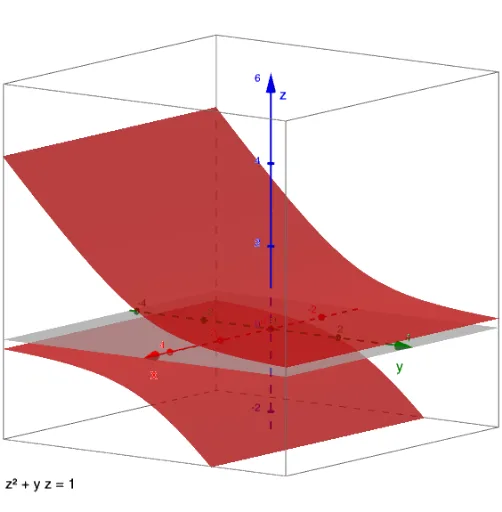
① This example demonstrates general quadratic surfaces (ellipsoids, hyperboloids, paraboloids, etc.) in a 3D GeoGebra view, allowing users to intuitively grasp their spatial shapes and classification. ② Core mathematical concepts include standard equations of quadric surfaces, cross-section analysis, symmetry, and intersections with coordinate planes (ellipses, hyperbolas, parabolas), bridging analytic geometry and solid geometry. ③ Construction highlights: The summary lists points A through J, an equation object eq1, and a text object text1, suggesting that a general quadratic equation (e.g., Ax²+By²+Cz²+Dxy+Eyz+Fzx+Gx+Hy+Iz+J=0) is entered and rendered via GeoGebra's implicit surface or surface command, possibly with sliders or point-driven parameter changes. ④ Suitable for high school seniors to early university students, this serves as a teaching aid for quadric surfaces in analytic geometry courses, and as a tool for developing spatial reasoning or mathematical modeling skills.
GeoGebra Commands & Parameters
Numeric A(0)Numeric B(0)Numeric C(1)Numeric D(0)Numeric E(1)Numeric F(0)Numeric G(0)Numeric H(0)Numeric I(0)Numeric J(-1)(A * x^(2)) + (B * y^(2)) + (C * z^(2)) + ((D * x) * y) + ((E * y) * z) + ((F * x) * z) + (G * x) + (H * y) + (I * z) + J = 0
AI Drawing Prompt Reference
Draw a quadric surface in 3D space defined by a general quadratic equation with six quadratic terms (x², y², z², xy, yz, xz) and four linear terms (x, y, z, constant). Set the coefficients as follows: x²=0, y²=0, z²=1, xy=0, yz=1, xz=0, all linear terms=0, and constant=-1, resulting in a hyperbolic paraboloid (saddle surface). Display the surface in a 3D coordinate system, show its intersections with coordinate planes (ellipses, hyperbolas, or parabolas), and illustrate its symmetry and cross-sectional features.
The prompt above was compiled from the original drawing commands and is for reference only.