
Parametric Cone Surface in Cylindrical Coordinates
Loading the math board and drawing, please wait…
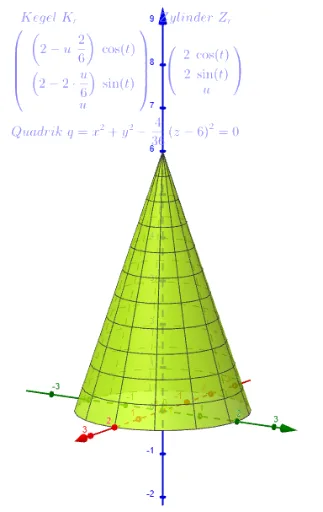
This example demonstrates how to represent a cone’s lateral surface using cylindrical coordinates and to render it as a 3D parametric surface in GeoGebra. It focuses on the math idea of expressing a solid’s geometry through a coordinate-dependent parameterization: cylindrical coordinate relations, the linkage between radius and height that defines the cone, and the general concept of a surface defined by parameters (mapping from a 2D parameter domain into 3D space). In the construction, the GeoGebra Surface command is used to create the curve/surface geometry. The key objects in the construction summary—h_r, r, r_x, K_r, Z_r, q, and text3—encode the parameter-to-coordinate mappings: r and r_x relate the radius components, K_r and Z_r convert the chosen parameter into the cone’s defining geometric constraints (radius-to-height relationship), and h_r captures the height dependence. By varying the parameter (e.g., q), GeoGebra sweeps over the parameter domain to generate the complete cone mantle. Suitable for advanced high school geometry, undergraduate analytic geometry, and introductory lessons on parametric surfaces and coordinate systems.
GeoGebra Commands & Parameters
Surface(((r - (u * r / h_r)) * cos(t)), ((r - (r * u / h_r)) * sin(t)), u, u, 0, (h_r / r * r), t, 0, (2 * π)) → K_rSurface((r * cos(t)), (r * sin(t)), u, u, 0, (h_r * r), t, 0, (2 * π)) → Z_r
AI Drawing Prompt Reference
Draw a 3D cone lateral surface parameterized in cylindrical coordinates. The cone has base radius r and height h_r. The surface is generated by parameters u (height direction) and t (azimuthal angle). As u varies from 0 to h_r, the radius decreases linearly from r to 0, forming the cone. Also draw a reference cylinder with constant radius r and height h_r. Both surfaces share the z-axis as central axis, with base at z=0. Emphasize the linear relationship between radius and height.
The prompt above was compiled from the original drawing commands and is for reference only.