
Parallelogram Area Demonstration by mrpettmaths
Loading the math board and drawing, please wait…
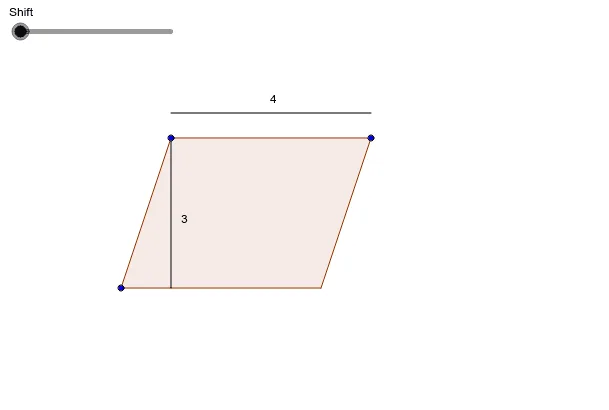
This example demonstrates how to calculate the area of a parallelogram using the base and height relationship. It involves core math concepts like parallelogram, area formula, vector, and geometric construction. GeoGebra commands/objects used include Segment, Line, Intersect, Polygon, OrthogonalLine, Vector, Circle, Translate. Suitable for middle school students and above for learning and understanding the calculation method of parallelogram area, as well as for mathematical teaching demonstrations.
GeoGebra Commands & Parameters
Segment(A, C) → bSegment(A, B) → cLine(B, b) → dLine(C, c) → eIntersect(d, e) → DPolygon(A, C, D, B) → poly1, a_1, c_1, d_1, b_1OrthogonalLine(A, d_1) → fIntersect(f, d_1) → EVector(B, E) → uVector(E, A) → vCircle(B, (a * d_1)) → gIntersect(g, d_1, 1) → FTranslate(F, u) → F'Vector(F, F') → wTranslate(F', v) → F''Vector(F', F'') → hPolygon(F'', F', F) → poly2, f_1, f'', f'Polygon(A, C, D, E) → poly3, a_2, c_2, d_2, e_1Vector(A, C) → iCircle(A, 0.5) → kIntersect(k, f, 1) → GTranslate(G, i) → G'Vector(G, G') → jLine(A, d_1) → lIntersect(k, l, 2) → HVector(A, E) → mTranslate(H, m) → H'Vector(H, H') → nSegment(G, G') → pSegment(A, E) → qSegment(H, H') → r
AI Drawing Prompt Reference
Draw a parallelogram, label its base and height, construct the parallelogram using the base and height, demonstrate area calculation with vectors including perpendicular lines, vectors, circles, and translations, and finally show two equal triangles to verify the area formula.
The prompt above was compiled from the original drawing commands and is for reference only.