
Triangle Area Demonstration by mrpettmaths
Loading the math board and drawing, please wait…
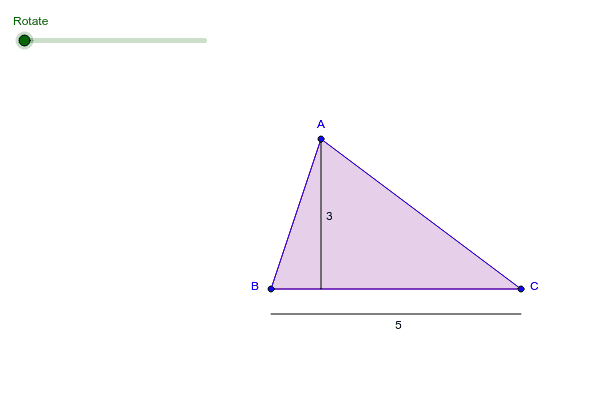
This example demonstrates how to find the area of a triangle by constructing a parallelogram. Key mathematical concepts include geometric construction and vectors. It uses commands like Polygon, Midpoint, Rotate, OrthogonalLine, Intersect, Circle, Vector, Translate, Segment, Line. Suitable for middle school and above students learning geometric construction and area calculation.
GeoGebra Commands & Parameters
Polygon(A, B, C) → poly1, c, a_1, bMidpoint(c) → DRotate(A, α, D) → A'Rotate(B, α, D) → B'Rotate(C, α, D) → C'Polygon(A', B', C') → poly1', c', a', b'OrthogonalLine(A, a_1) → dIntersect(d, a_1) → ECircle(C, (a * a_1)) → eIntersect(e, a_1, 1) → FVector(C, E) → uVector(E, A) → vTranslate(F, u) → F'Vector(F, F') → wTranslate(F', v) → F''Vector(F', F'') → fPolygon(F'', F', F) → poly2, f_1, f'', f'Polygon(A, E, B) → poly3, b_1, a_2, e_1Segment(A, E) → gVector(C, B) → hCircle(E, 0.5) → kIntersect(k, d, 1) → GVector(C, B) → iTranslate(G, i) → G'Vector(G, G') → jOrthogonalLine(E, d) → lIntersect(k, l) → H, ITranslate(H, f) → H'Vector(H, H') → mSegment(G', G) → nSegment(H, H') → pLine(C, d) → qOrthogonalLine(G, q) → rIntersect(q, r) → JTranslate(J, i) → J'Vector(J, J') → sSegment(J', J) → tSegment(A, E) → c_1
AI Drawing Prompt Reference
Draw a triangle and demonstrate how to calculate its area by constructing a parallelogram. Start by drawing a triangle, then find the midpoint of one side and rotate the triangle's vertices around this midpoint to create new vertices. Connect these new vertices to form a parallelogram. Use vectors and midpoints to construct auxiliary lines, find the height of the parallelogram, and draw a circle with the height as the radius to locate intersection points. Finally, construct auxiliary shapes using vector translations to show the relationship between the triangle's area and the parallelogram's area.
The prompt above was compiled from the original drawing commands and is for reference only.