
Area Model for Multiplying 4-Digit by 4-Digit Numbers
Loading the math board and drawing, please wait…
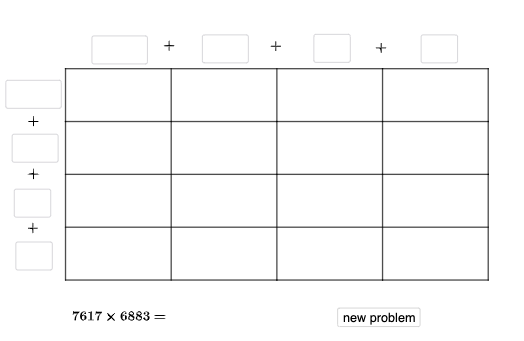
This example demonstrates how to use an area model to visualize the multiplication of a 4-digit number by another 4-digit number as a decomposition into rectangular area blocks, then add the partial products to obtain the final result. Key math ideas include place-value decomposition (thousands, hundreds, tens, ones), the distributive property reflected by the area layout, and organizing partial products via a grid. Construction follows the GeoGebra command structure: Random generates parameters for the displayed factors; Point and Vector establish the grid geometry; Translate reuses polygons/segments by shifting them; Polygon creates the area regions; Segment draws the partition boundaries; Textfield provides dynamic readouts of values; and If controls conditional elements such as labeling or visibility. Suitable for middle school learners and math instruction, especially for conceptual understanding of multi-digit multiplication and area-based decomposition.
GeoGebra Commands & Parameters
Random(1, 9) → a_1Random(0, 9) → w_1Random(0, 9) → b_2Random(1, 9) → r_5Point(yAxis) → D'Vector(D, J) → i_{5}Translate(F, i_{5}) → F'Translate(F', i_{5}) → F''Random(1, 9) → w_{5}Random(0, 9) → v_{6}Random(1, 9) → u_{4}Random(1, 9) → v_3Point(yAxis) → LPolygon(A, E, M, C) → q1, e, l_2, a_2, g_4Polygon(E, F, N, M) → q2, g_1, e_1, f_2, h_4Polygon(G, H, K, J) → q5, g_2, h_3, k_1, j_{2}Polygon(L, G, J, D) → q6, l_1, g_3, j_{7}, d_{2}Segment(D, A) → q_{3}Segment(J, E) → s_{4}Segment(K, F) → t_{4}Random(1, 9) → o_{3}Random(1, 9) → b_1Textfield(d_1) → aTextfield(m_1) → bTextfield(t_1) → gTextfield(u_1) → hTextfield(o_1) → mTextfield(p_1) → nTextfield(r_1) → qTextfield(s_1) → rTextfield(ansguess) → w_7If(n_1 ≟ v_{6}, "√", "X") → text3If(ansguess ≟ produc, "☺", "☹ ") → text7Segment(L, H) → r_{3}Segment(A, F) → m_{2}Segment(D, K) → p_{3}Vector(L, D) → c_{3}Translate(H, i_{5}) → H'Translate(K, i_{5}) → K'_{1}Translate(K', i_{5}) → K''Segment(D', K'') → j_{5}Segment(K'', F') → m_{3}Segment(F', F) → f_1Segment(H, H') → h_1Segment(K, K'_{1}) → i_1Segment(K', K) → h_2Segment(J', J) → i_2Segment(D', D) → k_2Textfield(c_2) → jTextfield(e_2) → j_{6}Textfield(n_2) → kTextfield(o_2) → oTextfield(p_2) → sTextfield(q_2) → fTextfield(r_2) → cIf(sidetrue, "√", "X") → text5If(toptrue, "√", "X") → text2Polygon(D, J, J', D') → q3, d_3, j_3, j', d'Polygon(J, K, K', J') → q4, j_4, k_3, k', s_2Polygon(K, K'_{1}, K'', K') → q7, k_4, k'_{1}, k'', t_2Polygon(H, H', K'_{1}, K) → q8, h_5, h', f_3, k_5Polygon(F, F', O, N) → q9, i_3, f_4, c_4, d_4Translate(H', i_{5}) → H''Translate(K'_{1}, i_{5}) → BTranslate(K'', i_{5}) → K'''Segment(K'', K''') → l_3Segment(K''', B) → n_3Segment(B, K'_{1}) → s_3Segment(H', H'') → t_3Segment(H'', B) → a_3Segment(F', F'') → b_3Segment(F'', H'') → e_3Textfield(u_2) → dTextfield(v_2) → lTextfield(w_{6}) → pTextfield(u_3) → tPolygon(K'_{1}, B, K''', K'') → q10, i_4, b_4, k''', l_4Polygon(H', H'', B, K'_{1}) → q11, m_4, h'', b_5, n_4Polygon(F', F'', I, O) → q12, p_4, q_4, r_4, e_4Segment(C, I) → a_4Polygon(C, M, G, L) → q13, c_5, m_5, g_5, l_5Polygon(M, N, H, G) → q14, m_6, n_5, h_6, g_6Polygon(N, O, H', H) → q15, n_6, o_4, f_5, h_7Polygon(O, I, H'', H') → q16, o_5, i_6, p_5, q_5Textfield(a_5) → iTextfield(w_3) → uTextfield(v_4) → vTextfield(d_5) → wTextfield(w_4) → w_2
AI Drawing Prompt Reference
Draw a rectangular area model for multiplying two 4-digit numbers. The large rectangle is divided into smaller rectangular blocks by horizontal and vertical lines, representing place values (thousands, hundreds, tens, ones). Each block corresponds to a partial product. Label each block with its numeric value. Below or beside the model, place several text input fields for entering partial products and the final answer, with feedback symbols such as checkmarks or crosses, and smiley or sad faces. Start with the outer rectangle, then partition it into a grid, add the dividing segments, and finally add the input fields and feedback icons.
The prompt above was compiled from the original drawing commands and is for reference only.